AI Agents and AI-Managed Inboxes: How They Work and What They Mean for Email


Key takeaways
- AI agents can do more than help with email. They can read incoming messages, determine what needs to happen next, and take actions such as routing requests, updating records, or scheduling meetings.
- AI-managed inboxes operate with varying degrees of autonomy. Some handle routine tasks on their own, while people step in for sensitive, complex, or high-impact decisions.
- ZeroBounce can now detect AI-managed mailboxes. This gives senders another layer of information about who – or what – may be receiving and acting on their emails.
AI agents are beginning to read, sort, route, and answer email on their own. Here’s how AI-managed inboxes work, who uses them, how to recognize them, and what they mean for the future of email.
Email used to be a very straightforward way to communicate. It’s even in the name: electronic mail, sent between a sender and a recipient.
Sure, filters and rules were working in the background, but you and another person were having a written back-and-forth conversation.
That model is changing quickly.
An incoming email may now be read first by software that can detect its meaning, compare it with the company’s data, and decide what should happen next and even take action.
The person named in the address, let’s say it’s John@, may read the email later. But a great deal of the time, a person may never need to see it at all.
Does that seem strange? Well, it’s going to become common.
This shift is creating an entirely new category of email: the AI-managed inbox. That means an inbox checked primarily by AI, and not human beings.
Adopters of the technology swear that it can save people hours of mundane work. But AI-managed inboxes are the hallmark of a radical evolution in email.
Email won’t always be about reaching people.
This change also creates a new challenge for senders: knowing whether an email address reaches a person or an autonomous agent. ZeroBounce can now detect AI-managed mailboxes. It gives senders another layer of information about who – or what – may be receiving their emails.
What is an AI agent?
An AI agent is software that can pursue an individual or organization’s goals, make decisions, and use other tools with a degree of independence.
The independence of an AI agent is what differentiates it from many of the AI tools people already use. An AI assistant generally responds to a prompt, provides information, or suggests an action. The person remains in control of what happens next.
A traditional bot is even more rudimentary. It usually follows a predetermined script or rule, such as sending the same reply whenever a message contains a specific phrase. Some bots are so simple that they tell people who interact with them to wait for a real person who will then respond to the information the user provided.
An AI agent is more advanced. It can interpret the situation, consider various options, and then complete a series of actions. In the email context, those actions might involve checking a calendar, reviewing a customer record, updating a help desk ticket, or retrieving any information from an order system.
AI agents are about far more than generating text. It uses email as the starting point for moving things along. Sometimes an AI agent can even completely remedy the problem or complete the task a person would normally take on.
Related: Read about ZeroBounce’s AI-managed mailbox detection
What is an AI-managed inbox?
An AI-managed inbox is an email account managed primarily by an AI agent rather than a person. Depending on its permissions, the agent can perform some tasks autonomously, without requiring human input each time.
The agent can assess incoming messages to determine what should happen next. AI-managed inboxes complete certain tasks with little or no human involvement. Depending on its role and the set permissions, it may prioritize emails, provide answers, route requests, and update business records.
These AI-managed inboxes do many things to save time, like schedule meetings or ask for additional details. In certain instances, the AI will escalate an unusual situation to a person.
What’s the difference between AI-managed and AI-assisted?
There’s a clear distinction between AI-managed and AI-assisted email accounts.
If your email provider generates a summary of a long thread and then you decide what to do, your inbox is AI-assisted. The AI assists you, but you remain the responsible party for the decision.
If an AI agent scans a meeting request, checks your availability, proposes a time, and updates your calendar according to rules you approved, your inbox is AI-managed. It frequently operates without your guidance.
Some organizations use a hybrid approach. AI handles the run-of-the-mill messages separately, while people review sensitive or more complex emails. A person still handles emails involving high-impact decisions.
How AI email agents work
AI email agents first require authorized access to an inbox, as well as additional permission to use other tools to complete their assigned tasks. Those tools may include a CRM, a calendar, a help desk, a knowledge base, a payment platform, or an internal database.
So what happens when a new email arrives? The AI-agent analyzes an email for the following:
- Who sent it
- What the sender needs or wants
- Whether the message is urgent
- What information or action is desired
- Whether the matter can be handled immediately and automatically
- When a real person should take over
The AI email agent can then consult approved company information and determine the next step. It may prepare and immediately send a response, create a task, update a record, apply a label, or route the email to the appropriate department. If needed, the agent will ask for human intervention.
The connections that make these actions possible are becoming more intricate. Google, for example, offers a Gmail MCP (Model Context Protocol) server, currently in Developer Preview, that allows authorized AI applications to search threads, retrieve emails, create drafts, and apply labels.
Microsoft Copilot in Outlook can prioritize and summarize messages, help triage the inbox, draft replies, and turn an email conversation into a meeting invitation. Its calendar capabilities can also carry out certain actions automatically based on instructions set by the user.
Who uses AI-managed inboxes?
AI-managed inboxes are especially efficient when an organization receives a high volume of emails that all require a set of similar decisions. Here are some examples where teams can benefit from AI inbox management.
Customer support teams
AI-managed inboxes are particularly useful for customer support teams. AI agents help support staff to identify the reason for a request, answer common questions, create tickets, and route more difficult cases to the right employee. It can quickly connect the customer to a solution.
Sales teams
Sales teams can use AI-managed inboxes to review inquiries, qualify prospects, summarize information, and update lead records. They can offer customers available meeting times so there’s less back-and-forth.
Job recruiters, finance, and operations managers
Recruiters can acknowledge applications and coordinate interviews. Finance and operations teams can extract information from invoices, purchase orders, and vendor requests.
Who are ideal candidates for AI inbox management?
AI agent email technology is not limited to large companies at all. A consultant, small-business owner, or even a lone professional in an organization may use an AI agent to organize incoming messages and prepare routine replies.
Businesses big and small can use AI agents if they receive lots of emails that all tend to require a similar response. The AI agent can call attention to only the emails that require personal judgment.
The best use cases for AI inbox management are tasks that occur frequently, follow a recognizable structure, and pose little risk if delegated. But critical situations or those requiring heightened privacy are not good candidates for the technology.
Why businesses are adopting AI inbox management
Email contains a surprising amount of administrative work. People spend time reading similar questions, finding the same information, updating records, forwarding messages, and arranging meetings. A ZeroBounce study shows that 35% of professionals spend up to five hours each day managing email.
AI agents can handle many of those steps. That may allow organizations to respond faster, provide coverage outside normal business hours, and apply the same routing criteria to every message.
An agent can also condense a long conversation into a useful summary before handing it to an employee. Instead of reconstructing the entire thread, the person can focus on the decision they need to make.
The goal should not be to remove people from important business relationships. It should be to reduce repetitive work so they have more time for conversations that require experience, empathy, creativity, or judgment.
How can you identify an AI-managed inbox?
An AI-managed email address may look exactly like one monitored by a person. There is no universal naming convention, label, or email header that identifies AI-managed mailboxes.
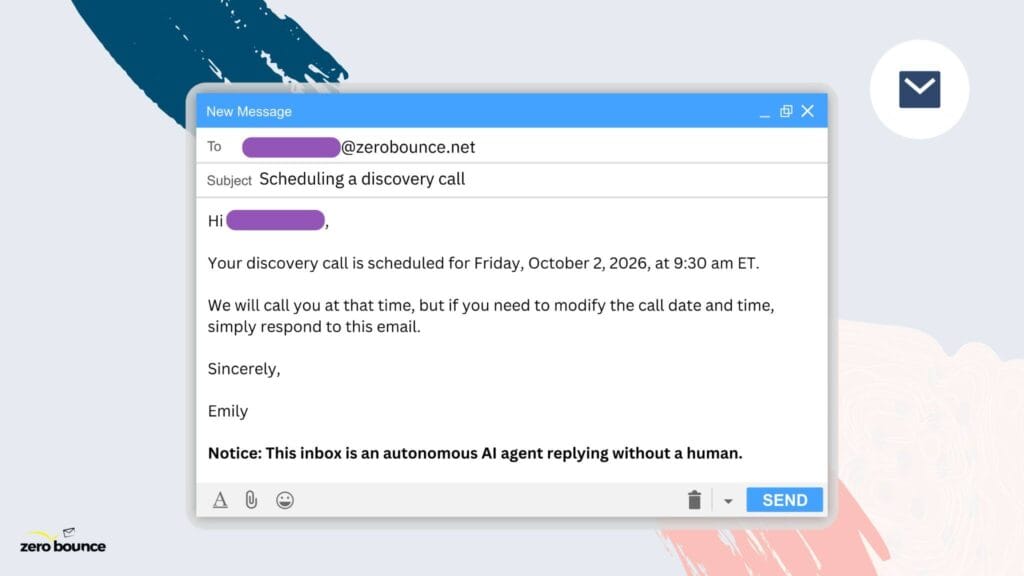
Certain behaviors may suggest that automation is involved. The address might respond within seconds, operate around the clock, ask highly structured questions, or route messages based on their content.
But none of these signs is proof. A well-organized customer service team can respond quickly and consistently, while an AI agent can be configured to sound casual and wait before replying.
Some organizations may disclose that an email was generated or handled by AI. Others may identify an agent in the display name or signature. However, disclosure practices are not consistent.
Specialized mailbox intelligence can provide a stronger signal. ZeroBounce uses proprietary mailbox intelligence and provider signals to identify addresses that appear to be managed primarily by autonomous AI agents.
The result provides context about how an inbox may operate. It does not reveal every action the agent is permitted to take or guarantee that a person will never read the email.
Curious how many AI-managed inboxes may be in your list? Create a ZeroBounce account and get 100 free email validations to find out.
How to communicate with an AI-managed inbox
The same qualities that make an email easier for people to understand also make it easier for an AI agent to process.
- Use a specific subject line and state your purpose early.
- Include dates, account numbers, requested actions, deadlines, and other essential details in plain language.
- If you’re asking several questions, separate them clearly.
- Avoid relying on sarcasm, implied meaning, or vague references to information buried elsewhere in the conversation. An AI agent may have access to previous messages, but you should not assume it understands every unstated detail.
- If the matter is sensitive or requires human judgment, say so directly. You can ask for your email to be reviewed by a person or request a human point of contact.
That does not mean your message needs to sound mechanical. Clarity and personality can coexist, and both human and AI recipients benefit from an email that gets to the point.
Related: Meet ZeroBounce MCP: Bring Email Validation into Your AI and Automation Workflows
AI-managed inboxes come with risks
Granting an AI agent access to your email account could expose it to confidential conversations, customer information, financial records, and internal systems.
Organizations need clear limits on what an agent can see and do. High-impact actions should require human approval, particularly when they involve money, contracts, private data, employment decisions, or emotionally sensitive situations.
Email itself also contains untrusted content. A malicious sender could place instructions in a message in an attempt to manipulate the agent. This is known as indirect prompt injection.
Other concerns include inaccurate summaries, inappropriate replies, privacy breaches, biased prioritization, and customers becoming trapped in an automated process when they need a person.
The potential to frustrate your customers is very real.
A responsible implementation starts with narrow tasks, limited access, clear escalation rules, and detailed activity logs. You can expand an agent’s authority once your organization understands how reliably it performs.
Valid mailbox or AI-managed? You need to know both
An AI-managed mailbox is not automatically a valid mailbox. Likewise, a valid mailbox is not necessarily managed by a person.
These are two separate pieces of information.
Before relying on an email address for sales, marketing, support, or account communication, you need to know whether the address is valid and can receive email.
Invalid and abandoned contacts can cause bounces and prevent important messages from reaching their intended recipients. Allowing low-quality contacts creates a snowball effect that threatens your email deliverability.
Email validation can also provide insight into how the receiving mailbox is managed. ZeroBounce identifies two types of AI-managed mailboxes:
- AI Agent Mailbox: A valid email address that appears to be managed by an AI agent.
- Catch-all AI Agent Mailbox: An address that appears to be AI-managed but is hosted on a catch-all domain.
An AI-managed classification is not necessarily a recommendation to remove the address. These mailboxes may belong to customers, prospects, vendors, and other legitimate contacts.
Instead, the information can help your company better understand your databases, compare engagement among different mailbox types, and determine when a message may need a clearer path to a person.
AI agents are becoming part of email’s infrastructure
Spam filters, shared inboxes, and automation have already changed what happens between sending an email and receiving a reply.
AI agents represent yet another significant step. They can understand a message, make a decision, and initiate work rather than simply sort the email or flag it for someone else.
Reaching the inbox remains important.
But as AI-managed inboxes become more common, senders like you will also need to consider what happens after the email arrives. And now senders must determine whether the first recipient is a person at all.
FAQ about AI agents and AI-managed inboxes
No. A chatbot responds within a conversation and may follow a limited set of rules. An AI agent can pursue a goal across several steps and use outside tools, such as email, calendars, databases, and ticketing platforms, to take action.
Not necessarily. Traditional email automation follows predetermined rules, such as forwarding every invoice to the accounting department. An AI-managed inbox can interpret the meaning and context of a message before choosing an appropriate action.
Yes, if it has been given permission to do so. Many organizations limit autonomous sending to routine, low-risk messages but require human approval for financial, legal, confidential, or sensitive communication.
Response speed, language, labeling, and behavior may offer clues, but none is conclusive. There is no universal public marker identifying an AI-managed mailbox. Specialized mailbox intelligence can provide a stronger signal based on provider and technical data.
No. AI management does not make an address unsafe, invalid, or unimportant. Consider the address’s validation result, consent, engagement, and relevance when deciding whether it belongs in an email campaign.
Validation helps determine whether the address can receive email and reduces avoidable bounces. AI-managed mailbox detection adds another layer of information by indicating that an autonomous agent may evaluate or act on the message before a person sees it.
Table of Contents
- Key takeaways
- What is an AI agent?
- What is an AI-managed inbox?
- What’s the difference between AI-managed and AI-assisted?
- How AI email agents work
- Who uses AI-managed inboxes?
- Customer support teams
- Sales teams
- Job recruiters, finance, and operations managers
- Who are ideal candidates for AI inbox management?
- Why businesses are adopting AI inbox management
- How can you identify an AI-managed inbox?
- How to communicate with an AI-managed inbox
- AI-managed inboxes come with risks
- Valid mailbox or AI-managed? You need to know both
- AI agents are becoming part of email’s infrastructure
- FAQ about AI agents and AI-managed inboxes
Related Posts
-
 Read Story
You don’t need an email deliverability crisis to benefit from an email health check. Learn how to evaluate your email list, sender...
-
 Read Story
Key takeaways: Cut the clichés. Overused phrases like “reaching out,” “touch base,” and “hop on a call” make your emails sound gen...
-
 Read Story
Key takeaways Email list fatigue isn’t about how often you send – it’s about whether your emails still feel worth opening. The war...
-
 Read Story
Google is rolling out Gemini-powered features to Gmail that change how emails are summarized, prioritized, and surfaced in the inb...
-
 Read Story
You might have the best CRM in the game, but if your data’s dirty, your lead scoring won’t mean a thing. Before you assign a singl...
-
 Read Story
Quick Answer What’s the easiest way to simplify email marketing? Short answer: Bring your tools under one roof. Instead of jugglin...