Quick Email Verification: The Fastest Way to Check an Email Before Sending


Just found an email address and are about to hit send? Wait! Even if it looks valid, it doesn’t mean it is. A quick email verification only takes seconds and helps you avoid bounces, reach real inboxes, and save time.
Maybe you found an email address on LinkedIn or listed on a company’s website. These days, AI tools and search engines make it easier than ever to find emails. Or perhaps you got the address the old-fashioned way, from a business card or jotted on the back of a napkin.
No matter where you got that email from, don’t skip an important step. Before you hit send, run the address through a quick email verification service. To you it looks like a valid email, but it can still have unseen issues that lead to you wasting time, getting a bounce or even a spam complaint.
But what’s the big deal? It’s just an email, right? What if it bounces?
If only it were that risk-free.
What you may not know is that the naked eye can miss plenty of problems:
- The smallest typo like a double or transposed letter
- Fake domains and disposable email addresses which can look legit
- Inactive inboxes (even though they worked before)
Doing a quick email verification helps you check the address in seconds so that you know it’s valid and safe to use. If you send an email to an address without validating it, there’s a good enough chance that it bounces, which will hurt your sender reputation.
Here’s the good news — there’s nothing to it. Verifying an email address is so easy. Here’s how you can do it in seconds.
Step 1: Find an email verification tool
There are plenty out there – pick a service with a good reputation that allows you to check email addresses for free. Then, type or paste your email address into the verification field and click “verify.”
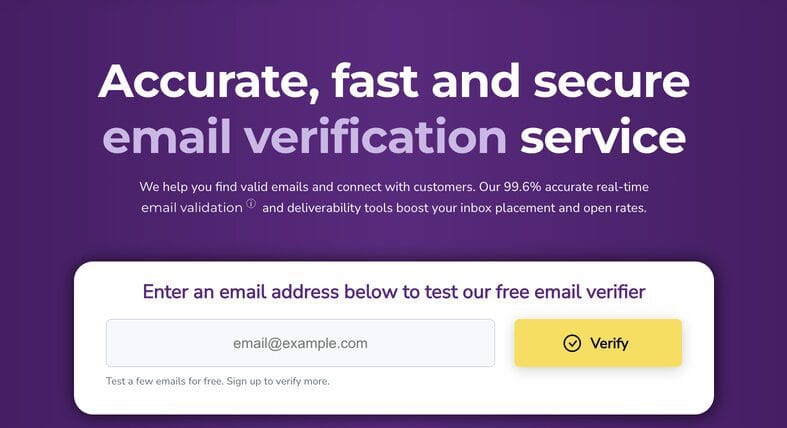
Step 2: Review the verification result
Once the scan is complete, look at the status. If it’s valid, go ahead and send the email. It’s all out there waiting for you.
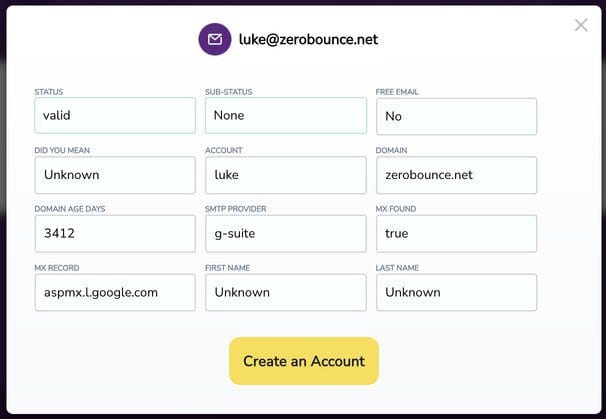
But oftentimes, you may get a different result. A quick email verification can reveal deeper and more specific issues with your address. For instance, your contact could be:
- Invalid
- Disposable or temporary
- Role-based
- Risky or likely to bounce
- Abuse
Using an email verifier is faster than a manual review – and much more accurate. You won’t be able to determine the validity of an email address just by looking at it. An email validator, on the other hand, can check if it’s valid, in use, and not a role-based or abuse email address.
That’s all there is to it. Quick email verification is a two-step process that can take less than 10 seconds.
Why bounces hurt your email deliverability
Knowing that an email is valid means you can send your message with more confidence. You also won’t compose a brilliant email only to find it bounces back to you like a rubber ball.
If it’s invalid or risky, chunk it so you don’t accidentally use it. Any bounces taint your sender reputation, which is the trustworthiness you build with inbox providers. If you start piling up the bounces, even legitimate subscribers may end up not seeing your emails as they can start going to spam.
It still happens to people a lot. They send an email to test if the contact is still active – all the while not knowing that it’s chipping away at their sender reputation.
Repeat this process before every send
Quick email verification only takes a few seconds, but it can help you:
- Reduce bounce rates
- Prevent spam complaints
- Protect your sender reputation
- Improve deliverability
- Avoid wasting time or storage on bad contacts
Whether you send 10 emails a week or hundreds, you always need to check contacts that you haven’t used before. If you emailed someone but it’s been a few months, you should still run a quick email verification. You’ll be surprised how often someone changes email addresses without telling you, especially in the B2B space.
Need to check more than one email?
What if you’ve got more than a few email addresses on your list? There’s a simple solution for that. Bulk email validation is also easy and applies the same technology to keep your email health in peak condition.
To verify an entire email list, upload it to your email validation platform and allow it to run a quick check. Then, keep only safe and valid email addresses. With email databases decaying fast, you want to repeat this process once a quarter to avoid bounce-backs and reputation problems.
Fifty-five years since the first email was sent, the channel is only growing. Billions of people use email, and 93% say they check it every day. So if you’re trying to use email to reach someone, it’s still one of the most reliable channels.
But to make sure your messages reach the inbox, run a quick email verification before every send. It’s how you keep a good sender reputation and avoid letting risky contacts undermine your hard work.
Related Posts
-
 Read Story
Before your next Mailchimp campaign, check your contacts for invalid and risky email addresses that could affect your deliverabili...
-
 Read Story
Gong Enrich helps sales teams find missing contact data without disrupting their workflows. With ZeroBounce email validation built...
-
 Read Story
If you’ve tested ZeroBounce, you’re not asking your boss to take a chance on a tool you’ve never used. You already have your first...
-
 Read Story
Catch-all vs. invalid emails: both can put your deliverability at risk, but for very different reasons. Learn how to tell them apa...
-
 Read Story
Key takeaways Vibe coding uses AI to accelerate software development. Claude Code, Cursor, GitHub Copilot, Windsurf, Replit Agent,...
-
 Read Story
Key takeaways Secure email gateways (SEGs) can make valid email addresses appear as catch-all or unknown during a standard SMTP va...