
Docs
Docs
The bulk email validator accepts .txt, .xls, .xlsx, and .csv file types. Please make sure your file is in one of our accepted formats. When you upload a file, our system will scan it. The file will be rejected if something unusual is detected. If you upload a .csv, .xls, or xlsx file, the first few columns will appear after you select the file you want to upload. Our system will try to determine the column's data type, as well. Any mistakes can be fixed before validation. If you can't get the system to accept your file, please use the help button on the bottom right to contact us.
Please make sure your file follows one of the formats here:
Allowed File FormatsColumn matching is important, because if you upload a .csv, .xls, or .xlsx file with a first name column, our system will use that information to tell you the gender of that email. Apart from the gender, our system also has the ability to determine the location, account creation date, first and last name of some of the emails you upload. It will use the data you provide and fill in the gaps. We don't store your emails or your data. Our Data Append feature uses public sources of information known to be 99.6% accurate. If the IP address is provided, we will append the city, region/state, zip code, and the country to the output.
All duplicate, uni-coded, and malformed email addresses will be removed from the list. So, if you upload a list of 5,000 emails and you have 1,000 duplicates, only 4,000 will be processed. No, you will NOT be charged for submitting duplicate, uni-code, or malformed emails. Invalid email syntax is different from uni-coded and malformed emails. Once your file finishes processing, look to the right side and click the Expand Results arrow. This will expand and show if any of the mentioned conditions above were found.
ZeroBounce will truncate all file names over 70 characters. We do this because Windows will only support 160 characters in a file path and with log filenames customers hit that limitation when extracting the files from the zip file. Please name your files accordingly, to not exceed the 70 character limitation.
Popular email domain lists:
Popular domain examples: Gmail, GSuite, Yahoo, Outlook, etc.
Mixed/uncommon/complex email domain lists:
Processing time will vary based on the domain type, configuration complexity, and the number of attempts required to accurately verify the data.
Allowed file formats:
Example Text File 1:
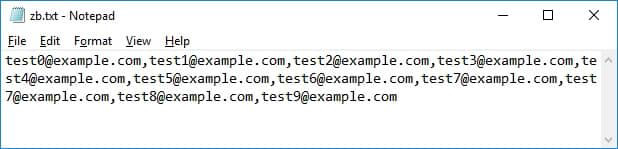
A TXT file that is separated with Comma's [ , ], Pipes [ | ], Tabs [ ], or Semi-Colons [ ; ] (without Carriage Returns and Line Feeds).
Example Text File 2:
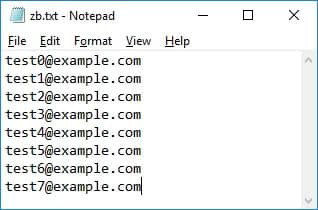
A TXT File with only (Carriage Returns and Line Feeds).
Example Text File 3:
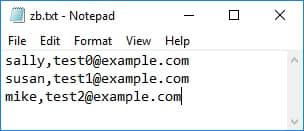
A TXT Files that looks like a CSV file will be converted to a CSV file when you upload it.
A CSV file is accepted if it's separated by Comma's [ , ], Pipes [ | ], Tabs [ ], or Semi-Colons [ ; ]. If it's separated with a different delimiter, it will consider your CSV File as a single column file. If you save your spreadsheet as a CSV or TXT file, the system will accept it.
Example CSV File 1:
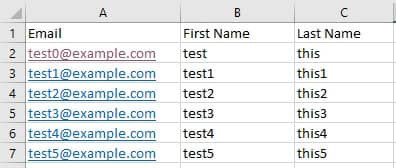
A typical accepted CSV file format
Example CSV File 1:
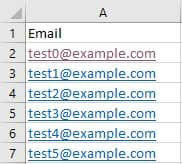
A typical accepted single column CSV file format
