DMARC Generator
What is a DMARC policy?
DMARC is an email security record that helps prevent spoofing attacks on your brand's email domain. It aligns your SPF (Sender Policy Framework) and DKIM (DomainKeys Identified Mail) email authentication checks and instructs ISPs on handling them.
To better understand DMARC records, let's quickly review their security partners.
SPF is an email authenticationⓘ check in which ISPs check your list of approved hostnames or IP addresses. If the sender is on your list, it passes the check.
DKIM is a unique, encrypted signature you add to every authorized email. The ISP looks up the signature, compares it to the key in the email, and issues a pass or fail accordingly.
Both of these are isolated email authenticationⓘ checks. However, with a DMARC policy, you can connect the two and help the ISP better protect its users and your email domain. DMARC records create a flow of operations for the ISP to follow if a sender fails either or both checks.
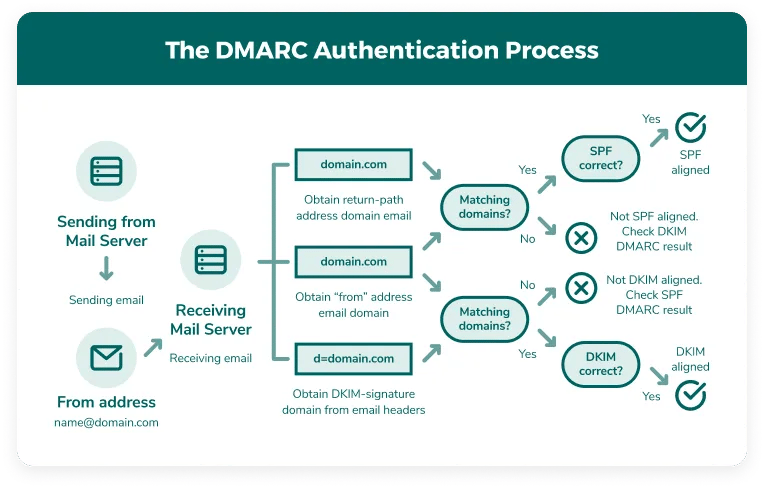
For example
Sender A fails the SPF check. The ISP then knows to issue the corresponding DKIM check. If A fails to authenticate, the ISP checks your DMARC records. You determine the following actions with your DMARC record policy.
DMARC policy options are as follows:
- None - The ISP takes no action and the message may reach the inbox. This is useful for early monitoring and observation. However, you are vulnerable as spoofers can readily reach users.
- Quarantine - Messages that do not pass email authentication go to a quarantine area if the email server has one available. Otherwise, these messages go to the spam folder.
- Reject - The ISP rejects messages that do not pass email authentication.
DMARC helps synergize your email security efforts and gives you greater control over your email activity. You'll also have ongoing reports to alert you of suspicious activity to know who to allow, quarantine, or reject.
The benefits of using DMARC records
DMARC is a necessity if you want to take your email reputationⓘ seriously. All you need to do is utilize our free DMARC generator and upload your new record to receive the following benefits.

Increased email security
SPF, DKIM, and DMARC are the three pillars of email security. By implementing a DMARC records check, you can better regulate who may send from your email domain. A DMARC record check aligns your email authentication protocols and provides ongoing reports of suspicious or harmful activity.

Improved email deliverability

Protect your brand's reputation
Using the DMARC generator
To create DMARC records, follow these tips when using the DMARC generator:
- Enter your email domain in the first field. If the domain is valid, you can use the remaining fields below.
- Select your domain policy type. Check the above passage to review the three DMARC policy options and their corresponding meaning.
These are the required steps to generate a DMARC record. You can find the code in the fields below the generator to enter into your TXT file.
However, you can enable optional DMARC settings if you choose to do so.
- This first optional setting allows you to set a policy for your email sub-domain. If you do not have a sub-domain or are unsure if the sub-domain authenticates emails, set this to none.
Your aggregate email is where you will receive your DMARC aggregate report. Also known as RUA, this advises you on the status of DKIM, SPF and DMARC checks.
Enter the email you wish to use for this report.
The DMARC forensic email, RUF, details a failed email authenticationⓘ check in greater depth. You can use this information to learn more about a potential attack. If a valid email fails a check, you can use the diagnostic data to rectify the issue for future sending attempts.
Enter the email you wish to use for this report.
Next, you can choose to have reports sent in two different formats:
- AFRF (Authentication Failure Reporting Format) - the default format for most applications and useful for general reporting
- IODEF (Incident Object Description Exchange Format) - useful for cybersecurity teams utilizing incident response tools
- Choose a DMARC reporting interval in seconds. The value must be between 1 and 4294967295. For reference, 86400 equates to one day.
- Select what percentage of messages you want ISPs to check. We recommend reviewing 100% of your email messages.
- Next, identify how strictly your emails adhere to DKIM. We recommend setting this to "relaxed." However, you can test your DKIM Identifier Alignment by creating an account and using our email testing tools.
- Finally, identify how strictly your emails adhere to SPF. Once again, we recommend setting this to "relaxed." However, our testing tools also include an SPF alignment check to ensure you can set your record up properly.
As you update each field, you'll notice that the DMARC generator creates three DMARC records automatically at the bottom of the page. Choose the available record that best suits your security needs.
Three Types of Available DMARC Records

DMARC Record
This is a standard line of code to create a TXT record within your DNS settings. Go to your DNS, click create a new record, and apply this code as the record value. Also, add "_dmarc" to the end of your chosen record name.

DMARC Record Using BIND
BIND is a commonplace software for DNS administrators and is compatible with Windows and Linux. Its ease of use, regular updates, and compatibility make it ideal for most users.

DMARC Record Using TinyDNS
TinyDNS, sometimes called djbdns, is a third, lightweight alternative that claims to offer improved security. However, platforms generally do not provide the same support or documentation as BIND, making it unsuitable for novices.