

You can clean up your Mailchimp list by running those email addresses through an email validation tool. Email validation runs each email address through a series of syntax, SMTP, and DNS checks to determine if an email address is both valid and configured to receive email messages. After the validation process is complete, each contact will be tagged with a corresponding status. To keep your list clean, filter out any email address that isn’t valid.
In many cases, Mailchimp will automatically remove email addresses from your audience that lead to hard bounces. However, a hard bounce will contribute to your overall bounce rate, which lowers your email deliverability. It’s strongly advised to try to avoid hard bounces by validating your email list before sending an email campaign with Mailchimp.
Invalid email addresses lead to hard bounces. An invalid email address is one that no longer exists, has an invalid domain, or has other configuration/authentication issues. If you try emailing an invalid email address, it causes a hard bounce. It’s recommended to use email validation for your Mailchimp audience to find invalid email addresses so that you can remove them.
Mailchimp provides email verification by partnering with services like ZeroBounce. You’ll need to create a free ZeroBounce account so that you can connect with Mailchimp and import your email list for email verification. The integration is free and requires no downloads and minimal setup.
Get 100 free monthly email verifications when you sign up with a business/premium domain

Integration
Zapier
Workato
We know you love Mailchimp. That’s why ZeroBounce partnered with the platform to help you clean your Mailchimp list and find real, valid email addresses.
Integrate the ZeroBounce email validationⓘ API to your Mailchimp mailing list to reduce email bounce rates and improve ROI. Send emails only to valid contacts in Mailchimp – get the free integration now.
Get 100 free monthly email verifications when you sign up with a business/premium domain.
Verify email addresses in Mailchimp with our easy-to-implement Mailchimp email validationⓘ API integration. Plus, get immediate access to these key features:
Keeping your Mailchimp list clean provides long-term benefits for you and your business.
Get rid of invalid, risky emails to avoid hard bounces. Validate emails in Mailchimp audiences to rapidly decrease your chances of messaging an invalid account. You’ll also prevent spam traps in Mailchimp effortlessly by identifying and filtering them out of your audience.
Using Mailchimp email best practices like validation, adjusting sending volume, and authenticating your emails will improve email deliverabilityⓘ in Mailchimp.
That means more of your emails will reach the inbox, keeping you connected with customers and out of spam.
Increase Mailchimp open rates and clicks by reaching the inbox with regularity.
The best way to drive email engagement is by guaranteeing visibility in the inbox. Then, you can analyze your campaigns accurately and adjust your content for maximum effectiveness.
When you improve email deliverabilityⓘ in Mailchimp, you strengthen your company’s sender reputation. Internet service providers use sender reputation, also called sender scoreⓘ, to determine if your company is trustworthy.
When your sender reputation improves, you’re given trust and priority placement in the inbox over those companies with lower scores.
Getting started with the integration is simple. Here’s what you’ll need to do:
1. Log in to your ZeroBounce account. If you don’t have one, you can create one for free! You’ll be able to test the integration and verify up to 100 emails monthly.
2. Select Mailchimp from the list of available integrations, and log in to your account. Once you authorize access, you’ll be ready to validate!
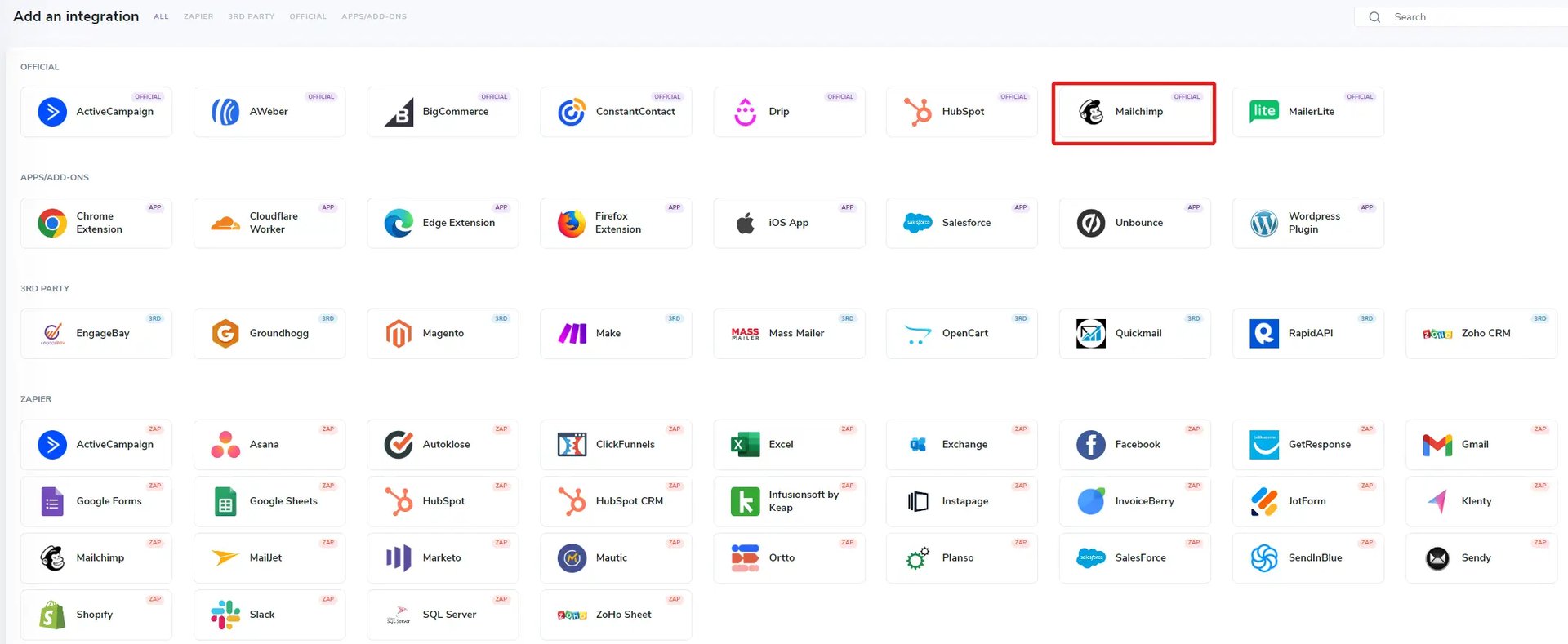
3. Pick the Mailchimp email list you want to clean and start verifying.
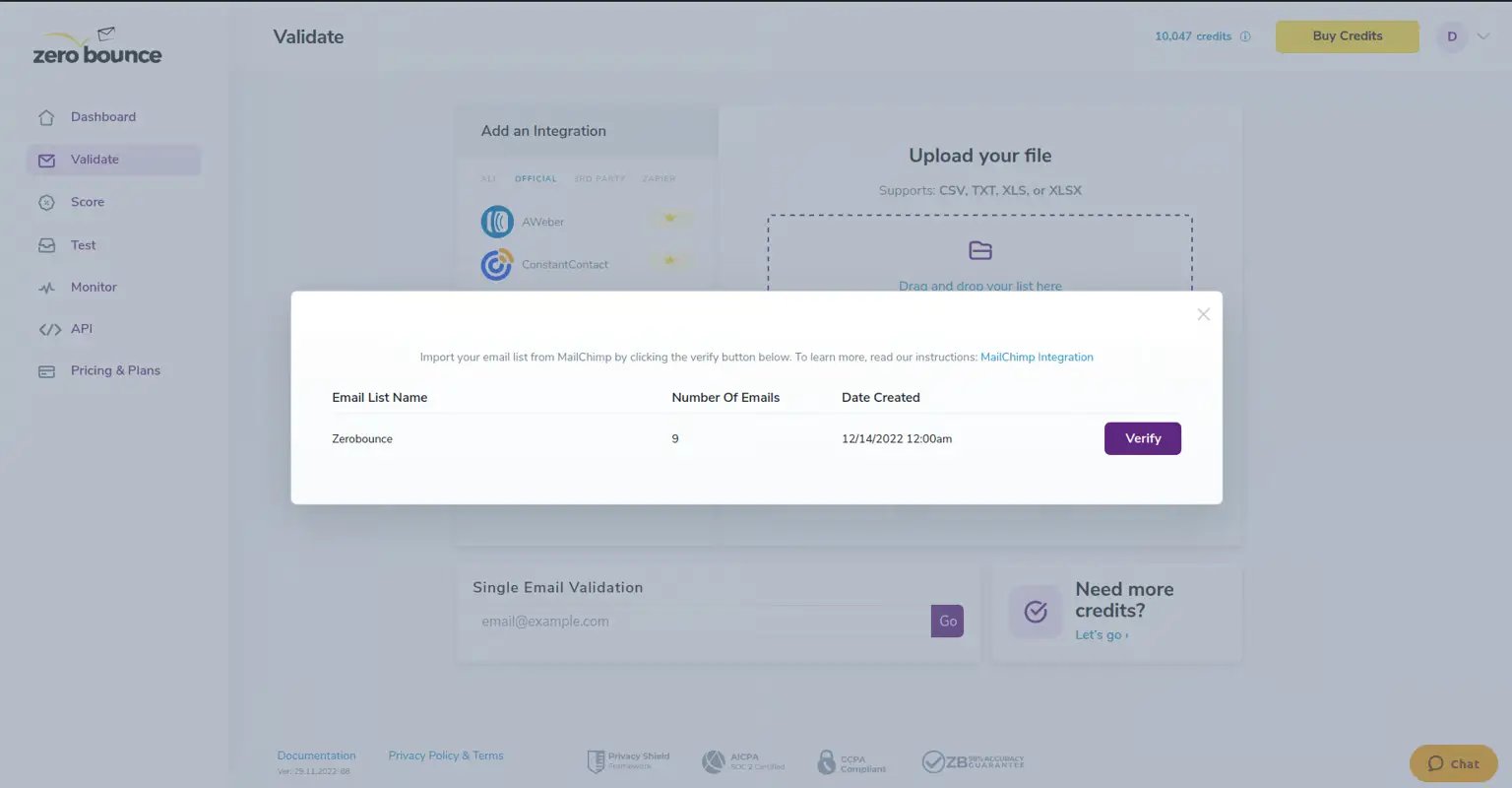
For an in-depth look at how to set up and use the Mailchimp ZeroBounce integration, take a look at the official documentation.
Visit the docsEnsure you’re sending your Mailchimp campaigns to real contacts with the free Mailchimp ZeroBounce integration! All you need is a free account to get access to this tool, along with these free monthly benefits:

100 credits for email validation and Email Scoring (credits never expire!)ⓘ

10 Email Finder queries

1 Blacklist Monitor

1 Inbox Placement Test

1 Email Server Test

Real-Time Email Verification API

Access to 60+ integrations(including Mailchimp!)
Credits never expireⓘ. Benefits replenish monthly.

Click on the Mailchimp integration from your ZeroBounce dashboard.

Log in to your Mailchimp account and provide ZeroBounce with access.

Click to import your Mailchimp email lists for email verification.
The Mailchimp ZeroBounce integration acts as your Mailchimp email validation service.
This free tool allows you to import an audience from your Mailchimp account to ZeroBounce for quick email list cleaning. After the list is scrubbed, you can export the new, clean list directly back to your Mailchimp account.
All of your contacts receive one of seven tags so that you know exactly what’s on your list. Improve your Mailchimp email list hygiene by filtering out invalid email addresses and focusing on valid, real contacts.
Maintain a clean Mailchimp list by monitoring every new contact that enters your email list.
After setting up the ZeroBounce Mailchimp integration, head over to your settings, select your audience, and turn on Contact Monitoring. Real-time email verification in Mailchimp makes it easier than ever to block invalid, risky email addresses.
The official Mailchimp integration allows you to rapidly import and export email lists to and from your account. No need for extraneous downloads and uploads.
Want to simplify your cleaning and focus on ‘valid’ results only? Just switch the ‘Valid Emails Only’ toggle, and the Mailchimp integration will automatically create a new email list in your Mailchimp account populated with ‘valid’ results from your latest
email validationⓘ
.
Keep your Mailchimp email database organized the way you like. The Mailchimp ZeroBounce integration allows you to customize map fields as desired so that you can send your validation and Scoring results to the right location. You can also revisit your map settings and update them at any time.
Many of your leads might have the ‘catch-all’ status. Those addresses “catch” any emails sent to otherwise invalid emails on that company domain (e.g., support@company). The problem is that you can’t validate them. With
Email Scoringⓘ
, you can use our proprietary technology and insights to score those addresses on a 1-10 scale. This number is awarded based on detected inbox engagement, making it more or less likely to be managed by a real employee. Score your catch-alls with the Mailchimp integration, and find your next sales lead!
Don’t forget your next
email list cleaningⓘ
- schedule and set up your email verification for Mailchimp through your integration settings. This won’t stop you from cleaning when you want, and you can adjust your preferred schedule at any time.
Have a need to share your email contacts between different platforms or CRMs? ZeroBounce Mailchimp verification allows you to rapidly share your cleaned email lists between supported platforms.
ZeroBounce is continuously adding official integrations with the Sharing feature so that you can import and export your data easily between your favorite tools. Share the benefits of Mailchimp list quality enhancement with the additional marketing tools in your repertoire.