
What Are Spam Traps?
Spam traps don't belong on your email list. Learn what they are and how they affect your deliverability.
Learn more

Written by Zach Nonnemacher
28 February, 2025
Email is the most reliable source of marketing ROI – granting up to $42 for every dollar spent.
That email revenue benchmark is only possible if your emails reach subscriber inboxes. Numerous factors, like bounce rate and engagement, can negatively impact your inbox placement. But none may be so impactful as email blacklists or blocklists.
If you find yourself asking, “Is my email blacklisted?” your company email domain may already be at risk.
This expert guide will explain how to tell if your email has been blacklisted and what you can do to fix it.
An email blacklist is a database of IP addresses and email domains that have a history of sending spam. The purpose of an email blacklist is to filter out spam senders and direct their messages where they belong – to the junk folder. In most cases, though, emails from blacklisted senders get blocked altogether.
We’ll explore these topics below to give you a full picture of how blocklists work, how they affect you, and how you can tell that your IP or domain may be blacklisted.
One of the first signs that your email is blacklisted is a decrease in your email deliverability and engagement. Email blacklists help mailbox providers intercept and trap spam in the spam folder. Therefore, having your IP or domain on one of these lists impairs your ability to reach the inbox.
Email expert and Mailchimp Pro Partner Emily Ryan, founder of Westfield Creative, says: “However, when their metrics drop, many marketers automatically assume people don’t care about their content anymore.”

The email pro adds: “We care so much about creating engaging content that we sometimes tend to overlook technical issues like this. If you haven’t changed your content and if your email list is valid and active, check your blacklist status. Nobody wants to end up on one, but being aware is the first step to getting off that list.“
ZeroBounce SMTP Deliverability Specialist Radu Pasarica suggests that bounced emails can indicate that your email has been blacklisted.

Expert Tip - If you unexpectedly bounce emails or notice a high email bounce rate on your campaigns, use a blacklist checker to see if you've been listed.
Email servers can cause hard bounces by blocking your domain. However, this differs from a typical hard bounceⓘ, which often occurs when you email an invalid address. A blocking is deliberate and is a telltale sign that there is an issue with your email domain or IP address.
Pasarica adds additional input on the matter:
“If your emails are being blocked and you cannot connect to the email servers, it may be because of a blocklist restricting your access.”
Expert Tip – Pay attention to the error message attached to a bounced email. If you receive a specific type of bounce-back error message (e.g., 550 5.7.1 Message blocked), it means that the recipient server has permanently blocked you. A permanent block may indicate that your domain or IP has been blacklisted.
A decrease in your email delivery rateⓘ goes hand-in-hand with an increased bounce rate.
Our SMTP specialist Pasarica adds one final tip:
“If you notice that a significant number of your emails are not being delivered, or your new campaign has a lower score than the previous one, it’s a strong sign of email blacklisting.”
Expert Tip – Never assume that a new campaign’s metrics will be similar to the last. After sending your campaign at the scheduled time, check your delivery and bounce rate. If you notice an unusual change from your normal metrics, consult a blacklist checker immediately.
All email blacklists operate under the same goal: to keep email safe by preventing spam from making it to user inboxes. But there are different kinds of email blacklists, and understanding them gives you more knowledge on how to get delisted.
These blacklists are free for you to consult. They are public, and any ISP can use them, so they’re the first you should consider when performing a domain or IP blacklist checkⓘ.
Anti-spam organizations create, maintain, and provide these types of blacklists as a service to larger entities such as ISPs and mailbox providers. The only way to check these lists is by using inbox testing tools.
Email providers like Google, Yahoo, or Outlook maintain their email blacklists. Getting on an internal blacklist of a popular provider is highly detrimental as it blocks your access to a large segment of your prospects. However, you can monitor these lists with inbox testing tools, too.
Another fact to keep in mind is that email blacklists can be:
A fast and easy way to run an IP blacklist check is by using multirbl.valli.org. It runs a complete check for your mail server IP to determine its status.
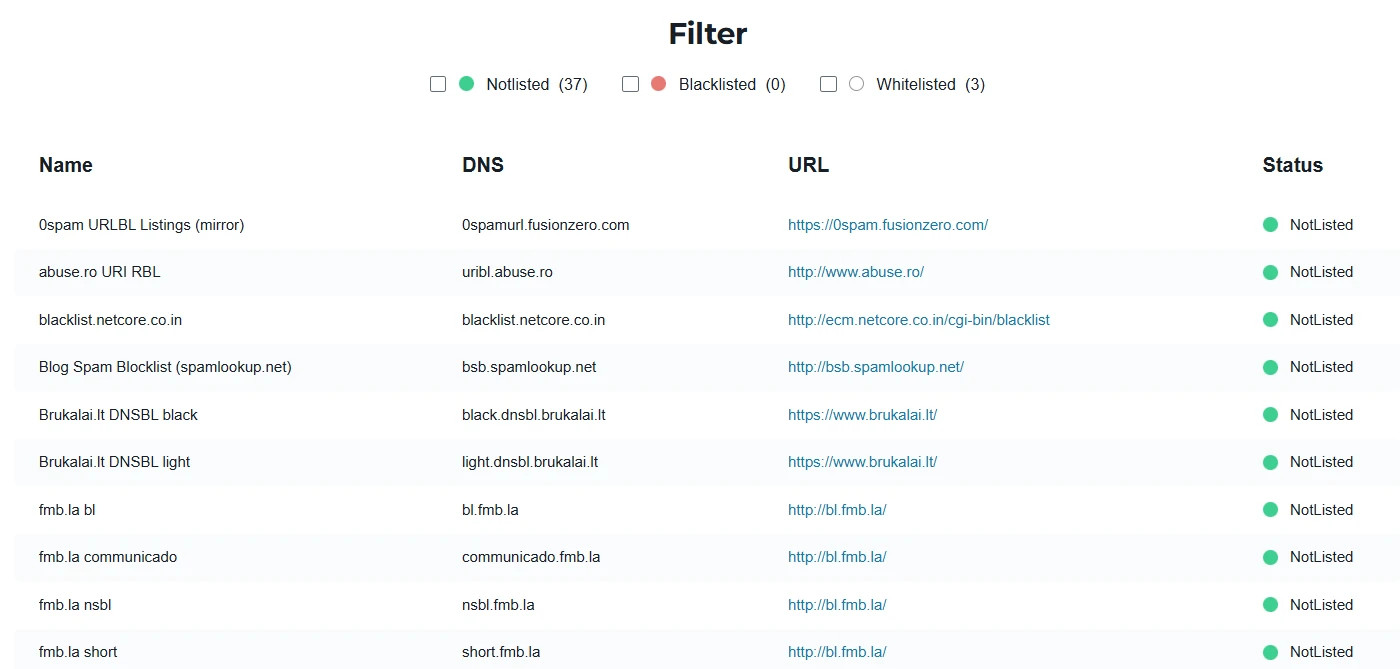
If you want to check both your domain and IP blacklist status, consider ZeroBounce's free Blacklist Checker. It checks against 200+ blacklists. In addition, if you scan your domain with this tool, it will provide you with every IP address associated with that domain so that you can easily check those as well.
Check your email blacklist status freeDo you suspect that your email domain or IP could be on a blacklist – or several?
Siva Devaki, Founder and Co-CEO of MassMailer has this to say about fixing a blacklisted email domain:
“It’s not hard to get off an email blacklist. However, depending on the organization you’re working with to delist your domain or IP, at times, it may be time-consuming or challenging.”
![Siva Devaki of MassMailer next to the quote, “At the end of the day, the rule of thumb for good ,[object Object], is not to spam.”](/cdn-cgi/image/fit=scale-down,format=auto,quality=90,width=1920,metadata=none/free-email-verifier/assets_next/free-email-verifier/is-my-email-blacklisted/is_my_email_blacklisted_5.webp)
He continues, “My advice is to get all the information ready to provide the correct justification to the delisting organization so that they can approve your request. You want to be genuine in your response, as they will certainly monitor your domain/IP for a few more weeks, even after the delisting takes place. At the end of the day, the rule of thumb for good email deliverabilityⓘ is not to spam.”
Here’s the step-by-step process to fix an email domain or IP that’s blacklisted.
There are two methods for determining if your domain or IP is on an email blacklist:
ZeroBounce's Blacklist Monitor runs email blacklist checks in real time for a domain/subdomain as well as IPv4 and IPv6 addresses. It compares both against more than 200 email blacklists.
![The Add New Monitor menu for ZeroBounce’s ,[object Object], tool.](/cdn-cgi/image/fit=scale-down,format=auto,quality=90,width=1200,metadata=none/free-email-verifier/assets_next/free-email-verifier/is-my-email-blacklisted/is_my_email_blacklisted_6.webp)
After you set your email domain or IP, enter an email address. The monitor will send an automated notification if either is found on an email blacklist. No additional actions are required.
If you receive a notification that your domain or IP is blacklisted, consult your blacklist monitorⓘ.
The ZeroBounce Blacklist Monitorⓘ will send a notification that lists and links to any discovered blacklists. Here’s an example of the notification:
![An email notification from ZeroBounce’s ,[object Object],, which indicates that example.com is now listed on 9 blacklist providers with links to each.](/cdn-cgi/image/fit=scale-down,format=auto,quality=90,width=1200,metadata=none/free-email-verifier/assets_next/free-email-verifier/is-my-email-blacklisted/is_my_email_blacklisted_7.webp)
For each email blacklist included, follow the provided links to contact each. Each service has a unique protocol to follow, so be certain to follow up quickly to determine why your domain or IP was added.
After contacting the blacklist service, they should provide you with feedback on what you need to resolve before you may be removed.
It’s critical to follow these instructions closely. In addition, take care to document the actions taken to include in your removal request. Show a good faith effort to help the provider prevent spam, and they will reciprocate by removing your blacklisted domain or IP.
Pro Tip – After you are removed from an email blacklist, the service may continue to monitor your domain or IP address. Not only should you be proactive with a blacklist monitor, but it’s important to regularly audit your email domain for configuration or security issues with regular campaign tracking, DMARC Monitoring, and email server testing.
While getting off an email blacklist can be a nuisance, avoiding one in the first place isn’t hard if you send emails responsibly.
Here are important rules to follow to avoid them.
Buying an email database may sound tempting, but refrain from doing that if you want to stay off email blacklists. When you purchase or rent an email list, you’re often buying recycled lists that have been sold hundreds or thousands of times. They also typically contain outdated, invalid emails and spam traps.
Additionally, the real users on those lists didn’t opt into your emails. They will report you as spam, which is a quick way to get blacklisted.
“You should always clean your mailing list of any invalid addresses or other types of bounces, honor your users’ unsubscribes, and have an opt-in-only policy.”
ZeroBounce Email Deliverabilityⓘ Expert
Radu Pasarica
Use a double opt-in confirmation to ensure you have consent from every new subscriber. Here’s how to do it:
A high bounce rate that exceeds 2% is a spam indicator. A consistently high bounce rate signals ISPs that you’re not checking the data you’ve acquired. An actual spammer will fire off thousands of emails with zero regard for who they’re emailing or if they have consent.
If your campaign has a high bounce rate, do this:
![The ZeroBounce ,[object Object], menu, which includes individual and ,[object Object],, integrations, and cloud-based file uploads.](/cdn-cgi/image/fit=scale-down,format=auto,quality=90,width=1200,metadata=none/free-email-verifier/assets_next/free-email-verifier/is-my-email-blacklisted/is_my_email_blacklisted_8.webp)
To further your data hygiene efforts and avoid bounces, use an email validation API on your data collection forms. This tool will allow your form to call the verifier using the API and reject any invalid or problematic email entries.
Here’s how:
With the API installed, your form will automatically detect and reject any invalid entries. It’s also helpful for alerting users to typos.
To mitigate potential inbox bans, use a tool that proactively monitors your email blacklist status. It saves you time and grants you peace of mind that you’ll be alerted right away rather than allowing a blacklist problem to linger.
Here’s how to set up a monitor:
![A list of 4 email blacklist services, including 0spam, abuse.ch, and abuse.ro in the ZeroBounce ,[object Object],.](/cdn-cgi/image/fit=scale-down,format=auto,quality=90,width=1920,metadata=none/free-email-verifier/assets_next/free-email-verifier/is-my-email-blacklisted/is_my_email_blacklisted_9.webp)
Note – The ZeroBounce Blacklist Monitor will send an automated notification if a change is detected for any of the available blacklist services. In other words, if your domain or IP is already on that blacklist, you will not receive a notification.
When building an email list, focus on quality over quantity. If users never open your emails, delete them, as poor engagement can impair email deliverabilityⓘ.
Inactive email addresses also pose additional risks: they may increase your bounce rate or be repurposed into spam traps, which will lower your sender scoreⓘ.
Inbox placement testers allow you to check the deliverability of your email campaign before you send it. The results will inform you whether your email went to the inbox, the spam folder, or went missing.
Here’s an example of how to use ZeroBounce’s Inbox Placement Tester:
![A list of ,[object Object], results using ZeroBounce.](/cdn-cgi/image/fit=scale-down,format=auto,quality=90,width=1920,metadata=none/free-email-verifier/assets_next/free-email-verifier/is-my-email-blacklisted/is_my_email_blacklisted_10.webp)
Within minutes, you’ll learn if providers like Gmail or Outlook identify problems that direct your email to the spam folder. This process can help you identify common errors that can impair your email domain or IP over time.
Anyone can report your email as spam at any time – including people who agreed to opt in. It’s not fair, but here’s what you can do in response.
Additionally, an email verifier like ZeroBounce can detect abusive emails. These emails belong to users with a notable history of issuing or misusing spam reports. Because the threshold for spam complaints is so low (0.1%), it’s best to avoid these people altogether.
Many legitimate senders end up on email blacklists. They may follow some email marketing best practices, but failing to abide by even just one rule can get them into trouble.
How can you avoid being one of these senders? Here’s what our SMTP Deliverability Specialist Radu Pasarica has to say:
“The most common and problematic mistake that can lead to an IP or domain being blacklisted is sending emails to large numbers of recipients who have not opted in to receive emails from you. This is spam. It’s unethical and is strictly prohibited by most email service providers.”
Our email deliverabilityⓘ expert also shares other common mistakes that can get your IP or domain on an email blacklist:
Email blacklisting scares many senders, and for good reason. When the emails you work so hard for go to spam (or not even there), your efforts are futile. You may be spending hours crafting compelling emails for your customers, only to see that…
This happens because people don’t see your emails anymore. Before you throw in the towel on email marketing, run an email blacklist check. Identifying potential IP or domain blockage may be stressful at first. But on the positive side, at least now you’re able to get your email off that blocklist.
If you think your email has been blacklisted, get in touch with us. Our team has extensive experience helping senders reach the inbox and is available 24/7.
Hit the chat button in the bottom-right corner – or send us a message, and someone will be there to help today.


Zach Nonnemacher is a former Content Manager at ZeroBounce. With seven years of digital marketing experience, he has created content for businesses across healthcare, finance, technology, SaaS, and real estate. During his time at ZeroBounce, Zach wrote extensively about email validationⓘ, deliverability, and email marketing.
Test our ZeroBounce's free email verifier tool by entering an email below.
or
Emails get blacklisted when senders don’t follow email marketing best practices. Spam traps, bounces, spam complaints, and dormant email addresses have a negative impact on your sender reputation. They indicate spammer behavior and can cause your domain and IP to get blacklisted.
Each email blacklist has a removal protocol. To get off an email blacklist, you must follow the recommendations of that organization and ensure you send emails responsibly. The steps can involve verifying your email list, changing your list-building habits, and handling spam complaints.
If your email gets blacklisted, your newsletters and campaigns will start going to the spam folder. In some cases, your emails may be blocked altogether, and your subscribers will stop hearing from you. Email blacklisting causes significant email deliverability issues and brings down engagement and revenue.
Email blacklisting is not permanent. If your IP and domain are on blacklists, you can take the necessary steps to have them removed. These steps include validating your email database, implementing double opt-in, and handling spam reports.
You can check if your email has been blacklisted by using an email blacklist checker. An email blacklist checker determines the status of your IP and domain and lets you know whether you’re experiencing an inbox ban.
Getting blacklisted by a large email provider like Gmail can cause havoc on your email marketing. Your emails will fail to reach large segments of your email list, causing poor engagement and a loss in revenue. You can check if you’ve been blacklisted by Gmail by using an email blacklist checker. Additionally, you can set up a blacklist monitor to alert you about your domain and IP blacklist status.