
What Are Spam Traps?
Spam traps don't belong on your email list. Learn what they are and how they affect your deliverability.
Learn more

Written by Zach Nonnemacher
21 February, 2025
The goal of email is to get your message where readers can see it – the inbox.
As of 2024, the average email deliverabilityⓘ rate was around 83%. Some emails reach their destination, while many get sent to spam. Others will bounce back to the sender.
How can you gauge your inbox placement, and, more importantly, how can you improve it?
First, we need to know what it means.
Inbox placement is the percentage of emails that reach the inbox compared to other folders, such as spam, promotions, or updates. In other words, a “delivered” email doesn’t mean that it was delivered to the recipient’s inbox.
Email delivery rateⓘ is the percentage of emails that are delivered to the recipient mail server. Delivery rate is calculated as follows:
Number of emails delivered to the recipient server / total number of sent emails = delivery rate
Notice that the delivery rate refers to emails accepted by the recipient server but doesn’t specify the end destination. As long as your email reaches the mailbox and any of its available folders (promotions, spam, etc.), it’s considered delivered.
Inbox placement, also known as email deliverability, describes the percentage of emails that reach the inbox folder. By improving your email deliverability with the right tools and strategies, you can increase your inbox placement and overall campaign performance.
Belkins, a B2B lead generation agency, experienced poor inbox placement due to email deliverability issues. Their bounce rate rose to 19%, which led to the telltale symptoms of poor inbox placement: a lower sender score and poor engagement.
However, by implementing email validation into their workflow, they quickly dropped their bounce rate to 0.4%. Addressing this primary email deliverability issue improved their engagement and cost-efficiency, demonstrating that their inbox placement rate was moving back in a positive direction.
Read the full case studyYou can calculate your campaign’s inbox placement rate by dividing the number of emails delivered to the inbox by the total number of emails sent.
(Number of inboxed emails / total number of sent emails) x 100 = Inbox placement rate
Inbox placement rate differs from the delivery rate as it specifically highlights emails placed in recipient inboxes. Note that it doesn’t include bounced emails, as it only compares the emails delivered successfully.
Here’s an example to help you differentiate your delivery rate from your inbox placement rate:
Campaign A results
Campaign A delivery rate
(9,900 / 10,000) x 100 =99%
Campaign A inbox placement rate
(9,200 / 9,900) x 100 = 93%
Be aware that it’s impossible to know your exact inbox placement rate, as only service providers have access to this data. However, you can approximate the visibility of your emails by including a tracker like a UTM or a URL code snippet that identifies the source of user traffic. Adding a UTM to your email links can provide a basis for determining the visibility and effectiveness of your emails.
You can also determine the likelihood of inbox placement by using a tool like ZeroBounce's Inbox Placement Test. Here's how it works:
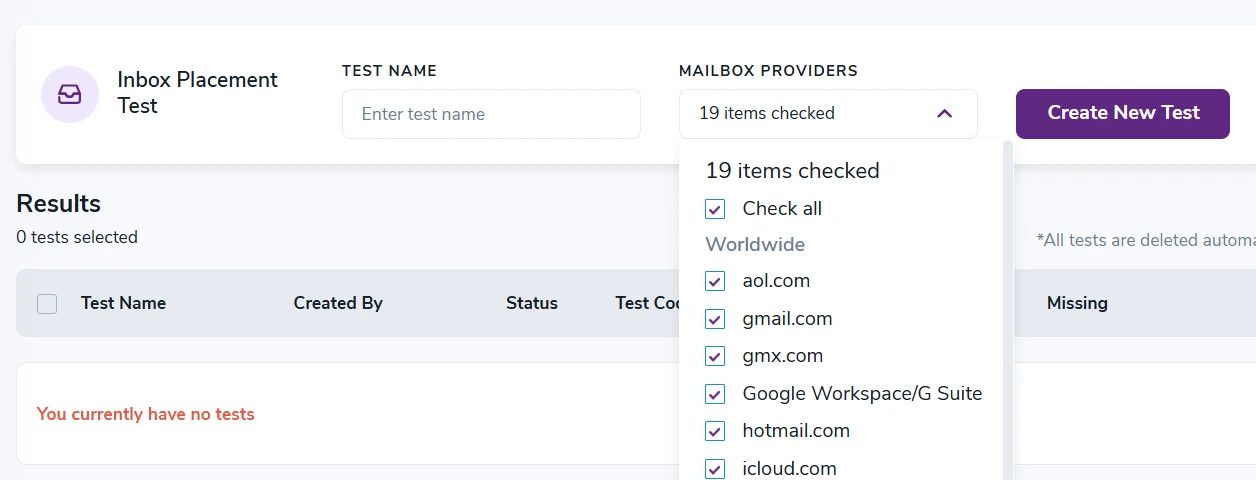
Select the mailbox providers to use when testing your inbox placement rate.
You can calculate your campaign's inbox placement rate by dividing the number of emails delivered to the inbox by the total number of emails sent.
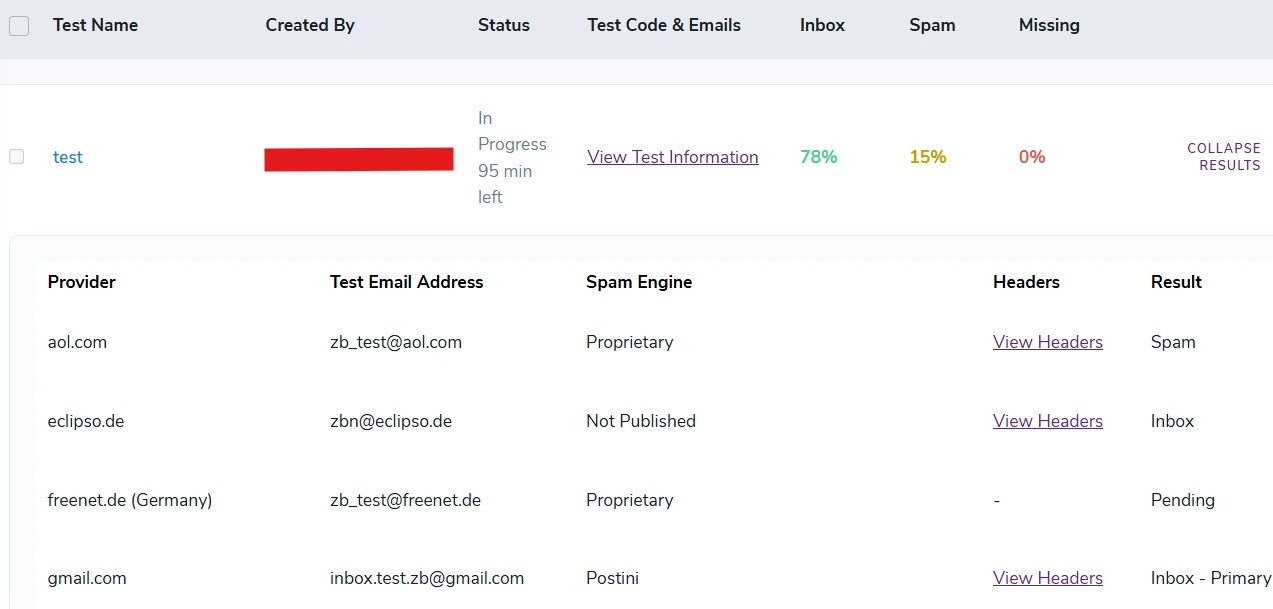
The inbox placement testⓘ will automatically populate with your email’s inbox placement rate.
You can check the results for each provider better to understand the reasoning for your inbox placement rate so that you can make adjustments accordingly.
Various technical and behavioral factors directly impact your inbox placement as a mass sender. Here are the most important ones.
Internet service providers use your sender reputation to assess your trustworthiness. A good sender reputation (around 90 or above) will result in strong inbox placement. Conversely, a poor sender reputation leads to increased spam placement and bounces.
Factors that lower your sender reputation include
In addition to your reputation, ISPs look for predictable behaviors and patterns. If you don’t typically send mass emails but unexpectedly send a campaign to 100,000 recipients, your inbox placement rate will be low. You need to ramp up your sending volume gradually by sending emails in batches and tracking your performance.
ISPs look for patterns synonymous with spammy behavior. If your subject lines are misleading or contain certain keywords, it can trigger a spam filter. The impact of spammy words or phrases is typically more severe when combined with a poor sender reputation.
ISPs also look at campaign performance to determine the relevance of your emails to your audience. If subscribers are opening and clicking your emails, it’s safe to assume your emails are safe and relevant. As a result, your inbox placement rate improves.
Major email providers like Google, Yahoo, and Microsoft require mass senders to use SPF, DKIM, and DMARC email authenticationⓘ. These records authenticate your business and show cooperation with these providers to maximize user privacy and security. Providers directly state that using email authenticationⓘ correctly will improve inbox placement over senders that do not.
Depending on your location and the location of the recipient, you may not be permitted to send an email without direct consent. A primary example of this is the General Data Protection Regulation (GDPR) for EU nations. Emailing users who haven’t opted in can impact inbox placement rate, net you spam complaints, and even earn fines and penalties.
Mass senders must also clearly and visibly provide a one-click unsubscribe method. Failure to honor these requests promptly or continuing to email these addresses will quickly lower inbox placement rates.
Here are several must-follow tactics that every mass email sender must use to reach the customer inbox consistently.
Your email list hygieneⓘ is the foundation of your email program. If your list contains invalid, fake, or outdated email addresses, expect high bounce rates and a poor sender scoreⓘ. Here’s how to fix it:
Pro tip – Use a real-time email validation API on any data collection forms. The validator will alert visitors to typos in their email addresses and reject any fake or invalid emails that will result in bounced emails.
Email authenticationⓘ protocols, such as SPF, DKIM, and DMARC, are excellent ways to increase ISP trust and inbox placement. Creating these records is free, and your ESP may also assist with implementation.
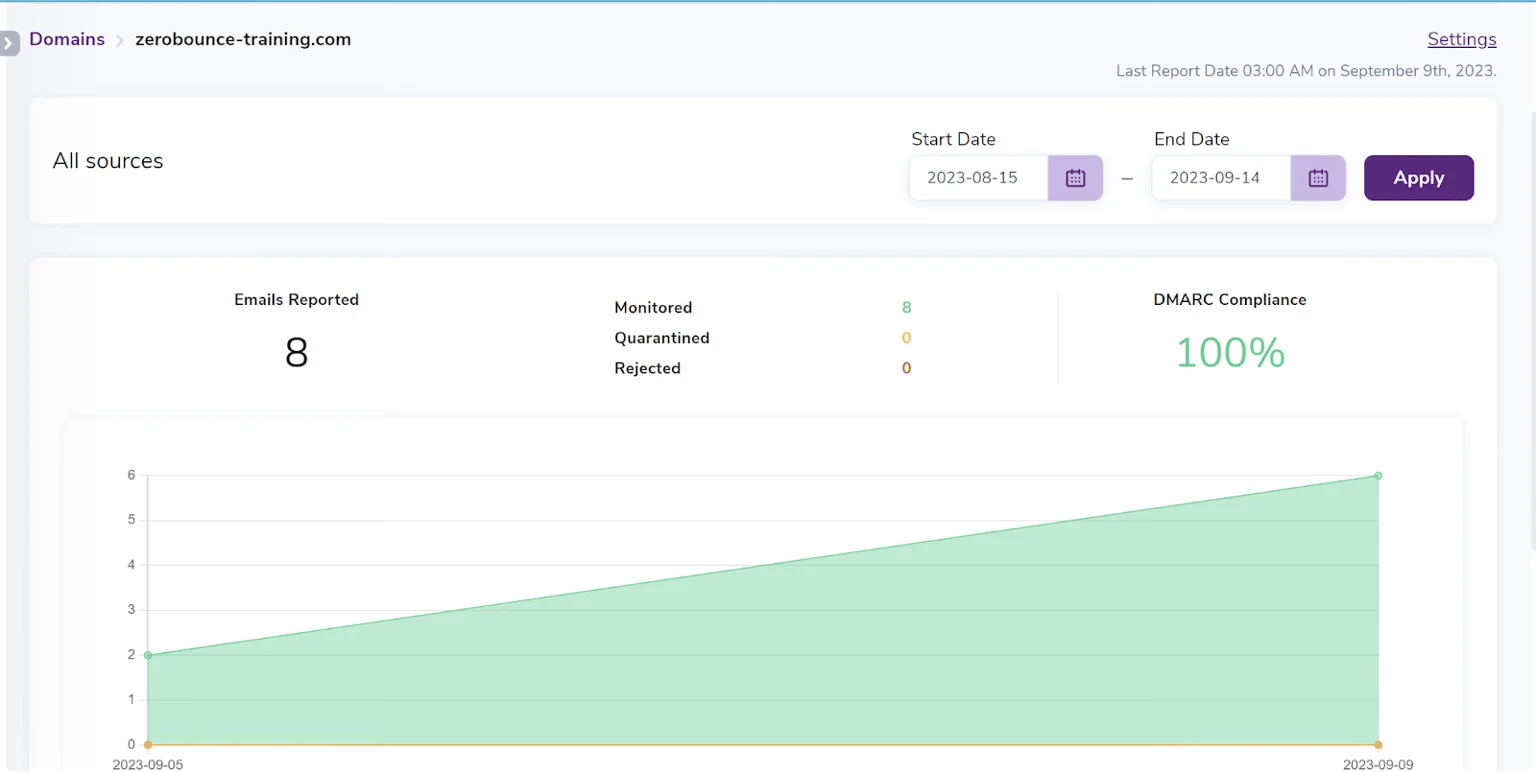
Monitoring your DMARC policy can help identify suspicious activity, such as spoofing and phishing, which can lower your inbox placement.
Pro tip – Monitoring DMARC compliance can help identify two major inbox placement risks: misconfigured protocols and potential spoofing or phishing activity in your business domain. Your monitor will alert you to unusual activity and provide instructions on how to identify and remove potential threats.
Every sender can benefit from email warmupⓘ. This strategy can build a good sender reputation from scratch, repair damaged reputations, and boost inbox placementⓘ for existing domains.
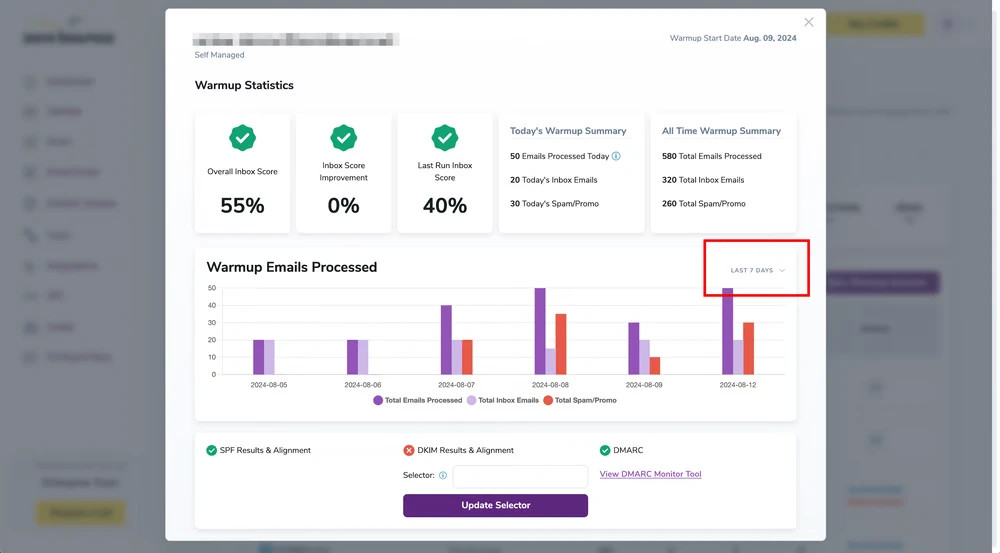
Your email warmupⓘ statistics track your daily inbox placement rate over time.
Pro tip – If you don’t typically send mass email campaigns, warm up your email domain for at least one month. If you send using a cold domain, most emails will either bounce or go to spam. Trusting a provider to perform a proper email warmup will boost inbox placement rates and help avoid any risks to your sender reputation.
Double opt-in confirmation assists with email list hygieneⓘ, but it also confirms subscriber intentions. Visitors commonly enter their email addresses into fields for promotions or offers but later have no recollection of signing up. This occurrence results in more inactive subscribers or spam complaints. Here’s how to do it:
Pro tip – It’s better to maintain a list of quality subscribers than to focus on quantity. Avoid holding on to contacts who show no interest for extended periods, as their lack of engagement negatively impacts inbox placement. You can also segment these inactive readers into other lists to experiment with new strategies.
Email marketing is a trial-and-error process. If your subscribers aren’t opening and engaging with your emails, stop sending the same types of emails. Here are some steps to consider:
Pro tip – Automated sequences are excellent for nurturing subscribers no matter where they are in the journey. Brand and product education can be great for first-time buyers. On the other hand, new leads will benefit from general education, which can recognize their pain points and offer immediate solutions.
Hundreds of email blacklist services exist online. If you unknowingly email a spam trap, experience high bounce rates or spam complaints, or show any activity deemed suspicious, you can end up on one.
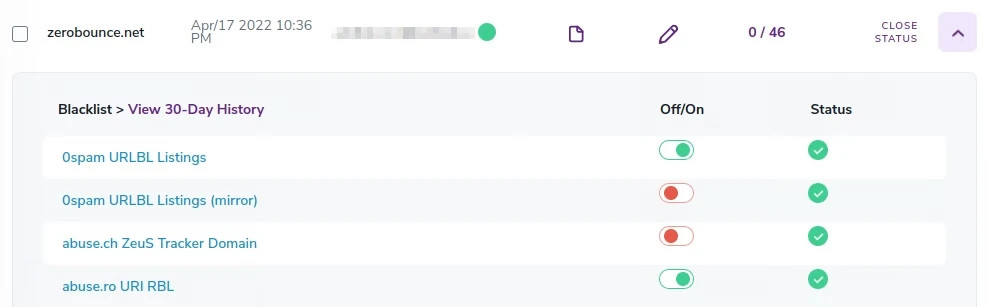
Set up automated blacklist notifications to prevent inbox placement issues caused by anti-spam services.
Pro tip – Monitoring your sender reputation can also alert you to issues. Use a free tool like Google Postmaster Tools to track your sender score and stay up-to-date with resolvable issues.
One of the best ways to encourage improved engagement metrics is to allow subscribers to change their content requests.
Pro tip – Professionals receive over one hundred emails daily. Segmenting your subscribers into specific mailing lists will help you create personalized content that stands out and is relevant to their interests. Tailor your emails to these lists, and continue monitoring campaign performance to keep your inbox placement rates high.
A condensed version of this article appeared in Entrepreneur Magazine in March 2021.


Zach Nonnemacher is a former Content Manager at ZeroBounce. With seven years of digital marketing experience, he has created content for businesses across healthcare, finance, technology, SaaS, and real estate. During his time at ZeroBounce, Zach wrote extensively about email validationⓘ, deliverability, and email marketing.
Test our ZeroBounce's free email verifier tool by entering an email below.
or
Inbox placement refers to the percentage of emails delivered to the inbox versus the total number of emails delivered.
Only ISPs know your exact inbox placement rate. However, you can approximate your inbox placement by using inbox placement testing tools and monitoring campaign metrics, including open and clickthrough rates.
You can calculate inbox placement rate by dividing the number of inboxed emails by the total number of delivered emails and multiplying it by 100.
Inbox placement and email deliverability are used interchangeably. Both terms refer to the number of emails delivered to the inbox compared to other folders, such as spam or promotions.
Delivery rate refers to the percentage of emails delivered to the recipient regardless of the destination folder. Inbox placement refers specifically to the percentage of emails delivered to the inbox compared to other possible folders, such as spam.