What Are Spam Traps?
Spam traps don't belong on your email list. Learn what they are and how they affect your deliverability.
Learn moreLearn how no-reply emails impact your email campaigns and find some no-reply email alternatives that work better.

No-reply emails used to be prevalent. But these days, they're becoming less common – and for good reason. For any benefit they might provide to your business, the damage they do can heavily set back your potential email revenue.
But before we learn why that happens, let's take a look at what no-reply emails are and why you should avoid no-reply addresses if possible.
A no-reply email is a message sent from a no-reply address. These addresses are configured to send outbound emails but not receive incoming messages. They typically have a no-reply indicator within the address itself or the body of the message.
Traditionally, businesses used no-reply emails to send important customer communications but simultaneously managed the amount of incoming questions or support emails they received in return. By minimizing customer inquiry volume, businesses sought to save time and cut costs.
No-reply emails are quickly becoming a thing of the past, and for good reason. Here's why you should avoid no-reply addresses moving forward.
Email readers are more likely to mark no-reply emails as spam. They do this because your no-reply email provides a poor customer experience and leaves them with no way to reply immediately. The customer has to go through several extra steps to visit your website and find the correct contact information to get in touch.
Internet service providers are aware of this. As a result, no-reply emails are likely to automatically trigger spam filters, decreasing the likelihood that your email will be visible in the inbox.
The more spam complaints and less engagement you receive, the worse your sender reputation will be. So, while you may minimize the number of inbound support requests you receive, you're achieving this at the high cost of your email deliverability.

Another reason why your no-reply emails get marked as spam is that the recipient may not be aware that it is a no-reply address. If they attempt to reply to your email, their message bounces, which impacts their sender reputation.
In addition to providing poor customer service, you actively put your subscribers at risk, particularly those using business domains. Don't be surprised if your subscribers then issue spam complaints or unsubscribe from your mailing list altogether.
As alluded to above, you shouldn't send emails to customers if the goal isn't to open a line of communication.
A quality customer experience and a reliable line of support can be a deciding factor in who someone decides to do business with. By using no-reply emails, you actively make it more difficult for customers to acquire new information about your product or business.
To encourage repeat business, you should strive to improve email interaction between yourself and your customers by making it easy to reply.
Important note - No-reply emails are also hazy when it comes to GDPR compliance. As part of the regulation, a subscriber must be able to request the data that a company has collected about them, as well as the right to request its deletion. By providing no way to reply, you deny the subscriber this right. While you may use other GDPR-compliant marketing email addresses, it's safest to use other no-reply email alternatives to avoid unnecessary risk.
Avoid no-reply addresses if your team can manage it. Instead, consider these tried-and-tested no-reply email alternatives, which can help manage the flow of inbound requests and improve customer engagement.
Any time you send an email campaign, you have the ability to add and customize the reply-to address in the header of the email. If you check any email in your inbox, it will look something like this:
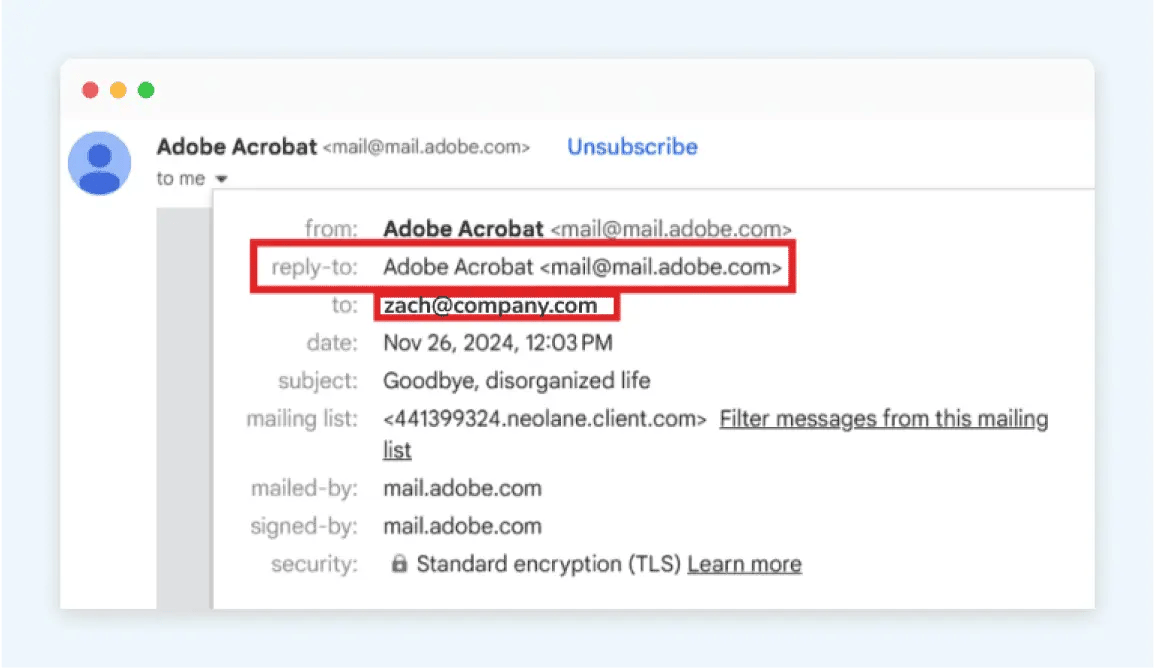
In this example, Adobe uses the same sending (or 'from') address as the reply-to address. However, you can help manage your replies by setting up a dedicated mailbox that's managed by your support team. Here's how ours looks for a typical campaign:
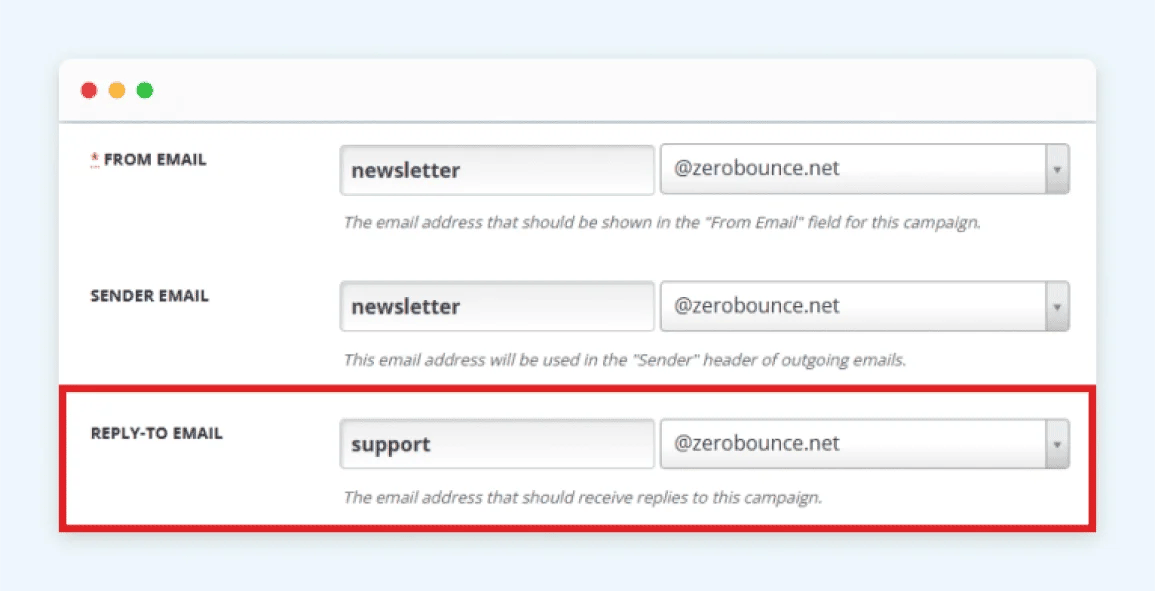
While the email itself comes from the mailing address 'newsletter,' all replies to this email will be directed to the mailbox ‘support@zerobounce.net’. With this setup, our support team only has to manage inbound requests from one location without the need to focus on multiple mailboxes.
If you've ever sent a reply to a business email or opened a support ticket, you may have received an email that looks something like this:
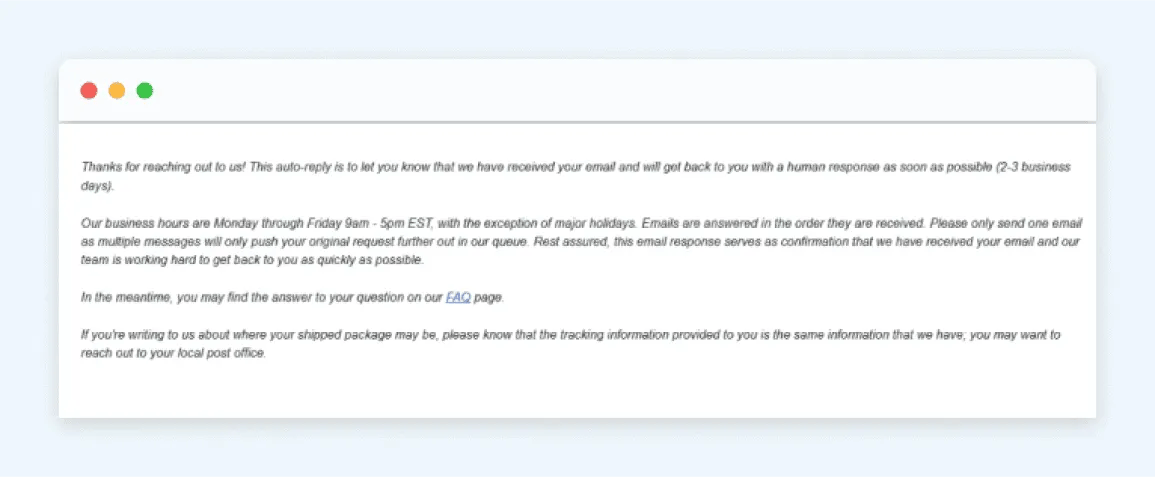
This is an email autoresponder. It is automatically triggered and sent as an auto-reply to anyone who replies to or contacts this specific mailing address.
Depending on your business size and resources, you may not have a support team large enough to handle the volume of inbound requests you receive (which is why so many businesses opt to use no-reply emails). However, you can still provide a quality customer experience by providing your subscribers with information on your support process and the average response time.
Doing this can help ensure your customers feel cared for while buying your team the time it needs to work through incoming requests in the order they're received.
Finally, you can help your customer support process by creating educational resources to answer some of your most commonly received questions. Note in the email autoresponder example above that the company recommends a link to its FAQ page for this reason.
For your website's FAQs, use your past email replies and support tickets to guide you. If you notice any patterns or repeating questions, it can indicate a lack of clarity or knowledge available to the customer when interacting with your business. A FAQ may be exactly what the customer needs to avoid the need for a reply from you.
Depending on the complexity of your service or platform, consider creating a dedicated help center or documentation. ZeroBounce maintains complete documentation for all of its services and features to provide users with step-by-step instructions and answers to common questions.
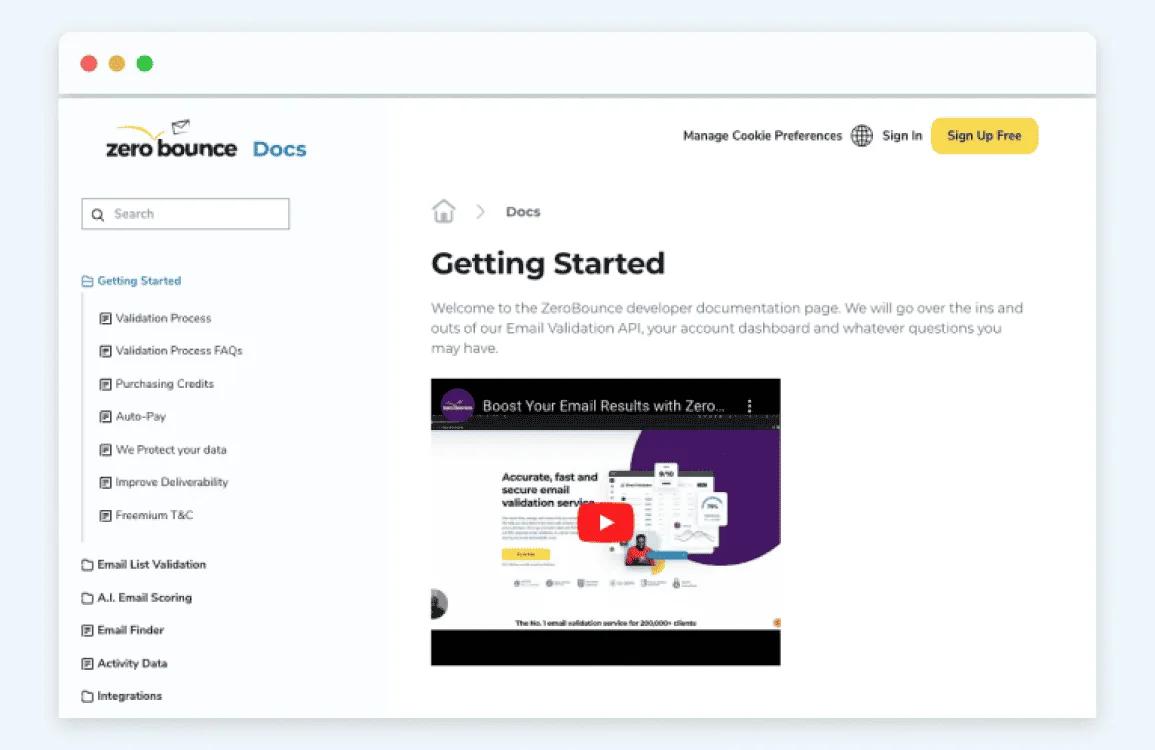
These customer resources aren't a replacement for replies or an excuse to use no-reply emails. However, they give more options to gain knowledge and improve customer engagement with your website and platform. They can also boost user satisfaction with the comfort of knowing that there are resources available to help resolve issues quickly whenever they arise.
To put some of these alternatives into action, here are our recommendations to ensure you're successful.
No-reply emails are typically titled ‘no-reply@company.com’ or something similar. The name is included to actively discourage readers from engaging.
Do the opposite for your reply-to email address. Common examples include the following:
You can also customize this to something more personal to your business. Make it clear and invite the user to use this address for replies or requests.
There are various SaaS tools available specifically to aid support teams with managing inbound tickets. Some popular examples include Zendesk, Salesforce, and Intercom, but there are dozens more available online.
These platforms help you avoid no reply addresses by syncing your custom reply-to email to their platform. Whenever you receive a reply or support inquiry via email, a ticket is automatically created in your SaaS dashboard for your team to review.
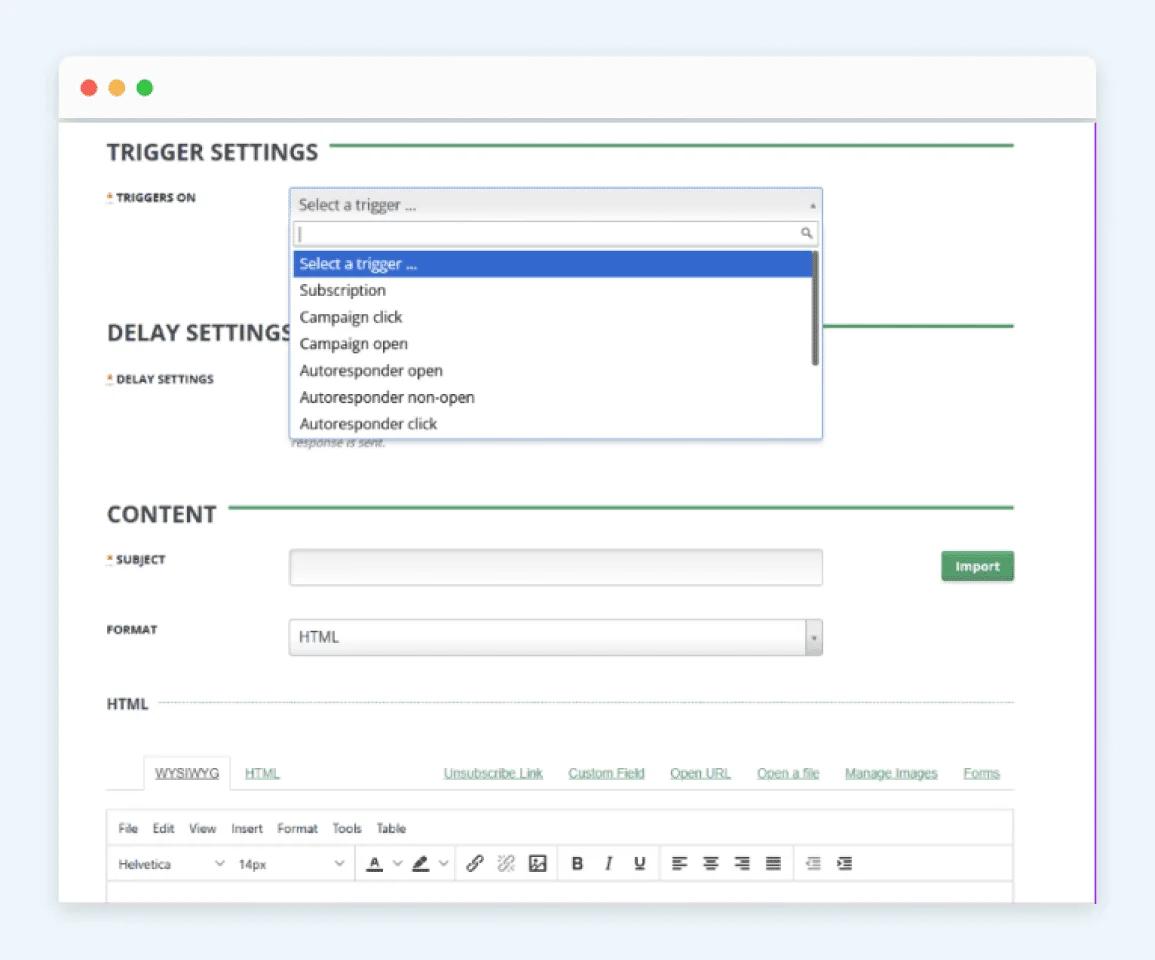
Due to the volume of replies you're likely to receive, you can't respond instantly. But you can trigger autoresponders to send out just moments after you receive a reply email message.
In this email, do the following:
The process for creating an autoresponder will vary depending on your email service provider. However, you can typically create one by going to the relevant menu for your mailing list.
A no-reply email is a message sent from an address that is not intended to receive responses, such as noreply@company.com. Businesses often use these addresses for automated or transactional messages. If you receive one, it usually means the sender does not expect you to reply directly to that email.
What happens depends on how the sender has configured the address. Your reply may bounce back as undeliverable, be sent to an unmonitored inbox, or be ignored entirely. In some cases, the business may route replies to another mailbox, but this is not guaranteed.
Usually, no. No-reply addresses are generally set up to send emails without actively receiving or monitoring replies. However, the exact behavior depends on the sender's configuration, so some no-reply addresses may technically accept messages even if nobody reads them.
In most cases, businesses should avoid no-reply email addresses when a monitored reply-to option is available. Allowing recipients to respond can improve customer experience and engagement. A dedicated support or reply-to inbox is usually a better alternative for managing responses without overwhelming the sending mailbox.
The only positive of using a no-reply email is to mitigate the volume of replies and inbound customer support inquiries your business receives. However, the cons far outweigh the positives, as using no-reply emails will hurt your email deliverability, may make your business non-compliant with GDPR, and provide a poor customer experience that minimizes customer engagement.
The best no-reply email alternative is a dedicated mailbox set up to receive and manage replies (e.g., support@ or help@). You can customize the reply-to email address for any campaign you send to ensure that responses are delivered to this address. Additionally, you can create customer resources like FAQs, a help center, and documentation to provide education and help minimize the need for direct customer support.
Reply-to emails improve email interaction by ensuring that subscribers have a way to respond. Replies are positive engagement signals that improve your sender reputation and email deliverability. By setting up a dedicated reply-to mailbox, you provide a better customer experience and maintain email deliverability while still controlling where customer replies go and how to manage them.
Create your free ZeroBounce account now to get started.
Get 100 free monthly email verifications when you sign up with a business/premium domain.