ZeroBounce Logo

Docs

Language Icon
  • Sign In
  • Sign Up Free

Languages

ZeroBounce ImageGetting Started
ZeroBounce ImageEmail List Validation
ZeroBounce ImageA.I. Email Scoring
ZeroBounce ImageEmail Finder
ZeroBounce ImageDomain Search
ZeroBounce ImageActivity Data
ZeroBounce ImageMulti-file upload
ZeroBounce ImageIntegrations
ZeroBounce ImageUsage Reports
ZeroBounce ImageYour ZeroBounce Account
ZeroBounce ImageEmail Validation API
ZeroBounce ImageEmail Finder API
ZeroBounce ImageDomain Search API
ZeroBounce ImageA.I. Scoring API
ZeroBounce ImageActivity Data API
ZeroBounce ImageList Evaluator API
ZeroBounce ImageApi Dashboard
ZeroBounce ImageAPI Wrappers
ZeroBounce ImageAPI Migration
ZeroBounce ImageFAQ
ZeroBounce ImageSecuring Your Account
ZeroBounce ImageAbout ZeroBounce
ZeroBounce ImageDeliverability Tools
ZeroBounce ImageStatus Page
  • Email Validation Homepage
  • Separator
  • Docs
  • Separator
  • Activity Data
Docs

ACTIVITY DATA

Use the official documentation to get started with email Activity Data and unlock engagement insights that help you connect with your email list's most active contacts. With Activity Data, you’ll be able to identify and track your subscribers' recent engagement data for email and on the web.

Please note that Activity Data is available only with an active ZeroBounce One subscription.

ZeroBounce's scoring partners help enrich your email validation results with the following information when available:

  • Last known activity date
  • Type of activities
  • How many activities were found
  • Activity data channels

This email data enrichment service is optional and available to all users.

Privacy notice: ZeroBounce's infrastructure maintains strict adherence to GDPR and privacy protections. Find more information about this by visiting our Privacy and Data Protection Policy.

How to use Activity Data

To add Activity Data insights to your email list, please complete the following steps:
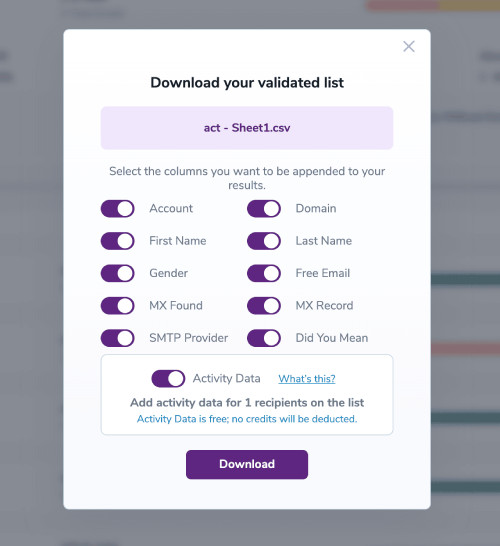
  1. Upload a file for email validation using the standard method. Once the email validation process is complete, click on the purple Download button to the right.
    Activity Data
  2. You’ll be presented with the Data Appends toggle menu. At the bottom, you can select the checkbox for Activity Data.
    Activity Data

    In the example test file pictured above, we will add Activity Data for 1 recipient when downloading the results file.

    By selecting the toggle, the Activity Data column will be added to the email validation results file. ZeroBounce’s scoring partners have matched the data and have returned the following possible results:

    Activity Data

    For the date of last known activity, the result will be 1 of 7 options.

    • null (not found) and no credit deducted
    • “30” - For a match with a last activity date that is less than 30 days old
    • “60” - For a match with a last activity date that is less than 60 days old
    • “90” - For a match with a last activity date that is less than 90 days old
    • “180” - For a match with a last activity date that is less than 180 days old
    • “365” - For a match with a last activity date that is less than 365 days old
    • “365+” - For a match with a last activity date that is more than 365 days old
      Signifies a potentially old and outdated contact - not recommended for cold emailing.

    Three additional columns will also be added when Activity Data is found:

    • ZB Activity Data Count: Integer/Empty
    • ZB Activity Data Types: String (comma-separated values, sorted alphabetically)/Empty
    • ZB Activity Data Channels: String (comma-separated values, sorted alphabetically)/Empty

    Example values:

    • ZB Activity Data Count: 24
    • ZB Activity Data Types: Click, open, buyer
    • ZB Activity Data Channels: email, web

    Once your file is downloaded, you’ll find the Activity Data enrichment columns listing the known results.

    Activity Data

    With this information now available, you’ll be able to create more targeted marketing campaigns aimed at your most active users.