ZeroBounce Logo

Docs

Language Icon
  • Sign In
  • Sign Up Free

Languages

ZeroBounce ImageGetting Started
ZeroBounce ImageEmail List Validation
ZeroBounce ImageA.I. Email Scoring
ZeroBounce ImageEmail Finder
ZeroBounce ImageDomain Search
ZeroBounce ImageActivity Data
ZeroBounce ImageMulti-file upload
ZeroBounce ImageIntegrations
ZeroBounce ImageUsage Reports
ZeroBounce ImageYour ZeroBounce Account
ZeroBounce ImageChanging Your Email
ZeroBounce ImageChanging Your Password
ZeroBounce ImageTwo-Factor Authentication
ZeroBounce ImageChanging Your Time Zone
ZeroBounce ImageNotification Settings
ZeroBounce ImageAccount Assist
ZeroBounce ImageInvoices
ZeroBounce ImageDeleting Your Account
ZeroBounce ImageTeam Accounts
ZeroBounce ImageAgency Feature
ZeroBounce ImageConfigure Okta SSO
ZeroBounce ImageConfigure Azure SSO
ZeroBounce ImageConfigure OpenID SSO
ZeroBounce ImageEmail Validation API
ZeroBounce ImageEmail Finder API
ZeroBounce ImageDomain Search API
ZeroBounce ImageA.I. Scoring API
ZeroBounce ImageActivity Data API
ZeroBounce ImageList Evaluator API
ZeroBounce ImageApi Dashboard
ZeroBounce ImageAPI Wrappers
ZeroBounce ImageAPI Migration
ZeroBounce ImageFAQ
ZeroBounce ImageSecuring Your Account
ZeroBounce ImageAbout ZeroBounce
ZeroBounce ImageDeliverability Dashboard
ZeroBounce ImageDeliverability Tools
ZeroBounce ImageEmail Warmup
ZeroBounce ImageStatus Page
  • Email Validation Homepage
  • Separator
  • Docs
  • Separator
  • Your ZeroBounce Account
  • Separator
  • Changing Your Time Zone
Your ZeroBounce Account

CHANGING YOUR TIME ZONE

Changing your ZeroBounce time zone settings is helpful if you move to a country with a different time zone.

It's really quick and simple to do.

To begin, sign in to your ZeroBounce account. From there, click on your Profile on the top-right menu. Then click on or scroll down to the "Time Zone" section.

  1. Step 1:

    Reach the Time Zone settings section
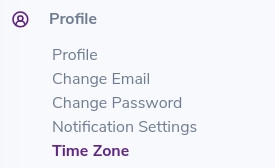
    TimeZone section found under the Profile of your ZeroBounce account

    TimeZone section found under the Profile of your ZeroBounce account

  2. Step 2:

    Set your new time zone preferences
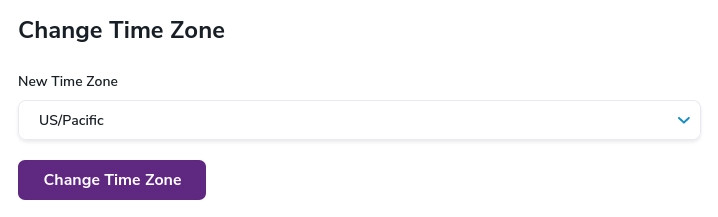
    Region or country selection for TimeZone settings for your ZeroBounce account

    Region or country selection for TimeZone settings for your ZeroBounce account

That's it! You're all set to use your email validator in the new time zone!

Cleaning your list regularly ensures you maintain a healthy sender reputation and high deliverability on your newsletters and email campaigns. Remember to validate your email database at least once per quarter or whenever you see signs that suggest low inbox placement – such as low open rates and a bounce rate higher than 2%.

If you're not adding many contacts to your email list, then make the most of the free email verification credits you get from ZeroBounce!

Every month, we replenish your account with 100 free email validationⓘ credits. Alternatively, you can score catch-all email addresses using the same credits – our email scoringⓘ service will help you figure out which ones are active.

Need help verifying your list or changing your time zone? Our team is available 24/7 to guide you.