ZeroBounce Logo

Docs

Language Icon
  • Sign In
  • Sign Up Free

Languages

ZeroBounce ImageGetting Started
ZeroBounce ImageEmail List Validation
ZeroBounce ImageA.I. Email Scoring
ZeroBounce ImageEmail Finder
ZeroBounce ImageDomain Search
ZeroBounce ImageActivity Data
ZeroBounce ImageMulti-file upload
ZeroBounce ImageIntegrations
ZeroBounce ImageUsage Reports
ZeroBounce ImageYour ZeroBounce Account
ZeroBounce ImageChanging Your Email
ZeroBounce ImageChanging Your Password
ZeroBounce ImageTwo-Factor Authentication
ZeroBounce ImageChanging Your Time Zone
ZeroBounce ImageNotification Settings
ZeroBounce ImageAccount Assist
ZeroBounce ImageInvoices
ZeroBounce ImageDeleting Your Account
ZeroBounce ImageTeam Accounts
ZeroBounce ImageConfigure Okta SSO
ZeroBounce ImageConfigure Azure SSO
ZeroBounce ImageConfigure OpenID SSO
ZeroBounce ImageEmail Validation API
ZeroBounce ImageEmail Finder API
ZeroBounce ImageDomain Search API
ZeroBounce ImageA.I. Scoring API
ZeroBounce ImageActivity Data API
ZeroBounce ImageList Evaluator API
ZeroBounce ImageApi Dashboard
ZeroBounce ImageAPI Wrappers
ZeroBounce ImageAPI Migration
ZeroBounce ImageFAQ
ZeroBounce ImageSecuring Your Account
ZeroBounce ImageAbout ZeroBounce
ZeroBounce ImageDeliverability Tools
ZeroBounce ImageStatus Page
  • Email Validation Homepage
  • Separator
  • Docs
  • Separator
  • Your ZeroBounce Account
  • Separator
  • Deleting Your Account
Your ZeroBounce Account

DELETING YOUR ACCOUNT

We don't want to see you leave, but if you decide to delete your account, below you will find all the info you need.

First, you should know that deleting your account will:

  • delete all your email validations, so you won't be able to access that data anymore
  • also, deleting your account will remove your access to the Members Area.

Many companies incorporate email verification into their digital marketing workflows, so you may need to validate your email list again in a while. If you want to create another account on zerobounce.net in the future, you will be able to do so with the same email address. We won't hold a grudge.

You can always come back and verify your list at 99.6% accuracy. Also, creating another account will give you access again to 100 free email validations a month.

To delete your account, sign in and click on "Account Options" on the left-hand menu. Then click on the "Delete Account settings" icon button in order to start the deletion process.

This will take you to the webpage below.
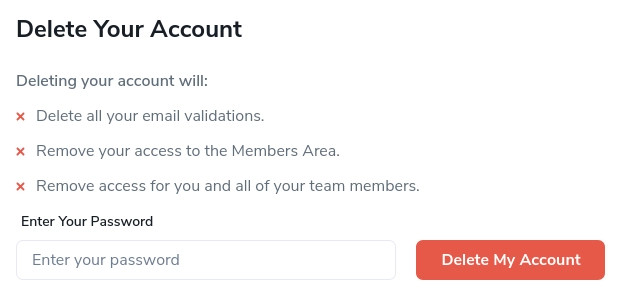
The delete your ZeroBounce account section with its password field and delete account button

Deleting Your Account Screen.

Simply follow the on-screen instructions and type in your password. Then, click the Delete Account button. That's it!

Come back when you need to clean your email list again.