ZeroBounce Logo

Docs

Language Icon
  • Sign In
  • Sign Up Free

Languages

ZeroBounce ImageGetting Started
ZeroBounce ImageEmail List Validation
ZeroBounce ImageA.I. Email Scoring
ZeroBounce ImageEmail Finder
ZeroBounce ImageDomain Search
ZeroBounce ImageActivity Data
ZeroBounce ImageMulti-file upload
ZeroBounce ImageIntegrations
ZeroBounce ImageUsage Reports
ZeroBounce ImageYour ZeroBounce Account
ZeroBounce ImageChanging Your Email
ZeroBounce ImageChanging Your Password
ZeroBounce ImageTwo-Factor Authentication
ZeroBounce ImageChanging Your Time Zone
ZeroBounce ImageNotification Settings
ZeroBounce ImageAccount Assist
ZeroBounce ImageInvoices
ZeroBounce ImageDeleting Your Account
ZeroBounce ImageTeam Accounts
ZeroBounce ImageConfigure Okta SSO
ZeroBounce ImageConfigure Azure SSO
ZeroBounce ImageConfigure OpenID SSO
ZeroBounce ImageEmail Validation API
ZeroBounce ImageEmail Finder API
ZeroBounce ImageDomain Search API
ZeroBounce ImageA.I. Scoring API
ZeroBounce ImageActivity Data API
ZeroBounce ImageList Evaluator API
ZeroBounce ImageApi Dashboard
ZeroBounce ImageAPI Wrappers
ZeroBounce ImageAPI Migration
ZeroBounce ImageFAQ
ZeroBounce ImageSecuring Your Account
ZeroBounce ImageAbout ZeroBounce
ZeroBounce ImageDeliverability Tools
ZeroBounce ImageStatus Page
  • Email Validation Homepage
  • Separator
  • Docs
  • Separator
  • Your ZeroBounce Account
  • Separator
  • Notification Settings
Your ZeroBounce Account

NOTIFICATION SETTINGS

Do you want to know when your email list is ready for download or when your account is accessed by a new IP address? Below you'll find the info you need to set up your ZeroBounce notifications.

ZeroBounce can send out email notifications to keep you up to date about different events and useful information.

We understand that some notifications are important to some customers, but might not be important to you. That's why you have complete freedom to customize your preferences and get alerted only about the things that matter to you.

To begin, sign in to your ZeroBounce account. From there, click on your Profile on the top-right menu. Then click on or scroll down to the "Notification Settings" section.

Please use the buttons below to set your preferences. You can choose whether you want to know:
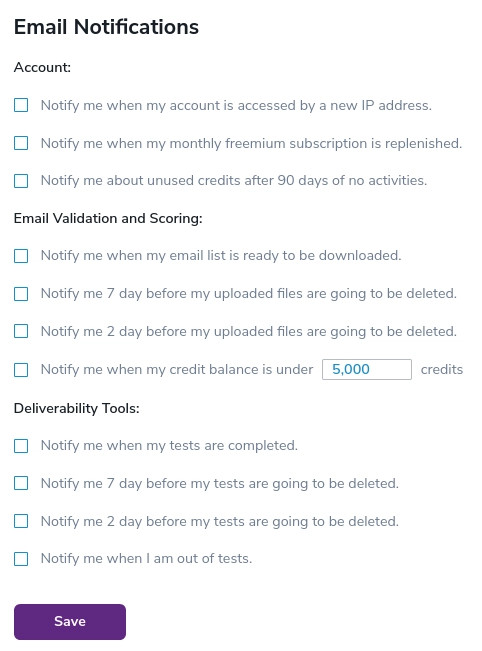
  • when we finished cleaning your email list so you can download it
  • when we replenished your monthly 100 free email validationⓘ credits
  • or when your credit balance falls under a certain threshold.
Notification settings of your ZeroBounce Account

Also, we can notify you 7 and 2 days before we delete your email verification files from your account. We do not store these results for more than 30 days, so please make sure you retrieve them in time.

Need help with your ZeroBounce settings? Drop us a line – our team is here to assist you 24/7.