
Docs
Docs
ZeroBounce Warmup improves your sender reputation by simulating genuine email activity between real inboxes. By default, this engagement follows standard patterns — but Custom Engagement Rule Configuration (CERC) lets you define those patterns yourself.
With CERC, you control the percentage of warmup emails that receive three types of engagement from seed inboxes:
These percentages are applied across your daily warmup activity, directly shaping how inbox providers perceive your sending behaviour. Configuring them to match your real outreach style helps build a sender reputation that performs when it matters.
CERC is configured at the individual sending account level. Each account has its own independent rules.
Initial configuration: When CERC is first enabled, your engagement rule is not set to fixed default values. Instead, the ZeroBounce onboarding AI selects the most appropriate starting configuration based on your answers during onboarding. The initial rule will be one of five preconfigured profiles: Default, Slow Pace, Protect, Repair or Boost. CERC lets you customise beyond that starting point at any time, subject to the 7-day cooldown.
Important: The three engagement values are not mutually exclusive and do not need to sum to 100%. Each percentage is applied independently to your daily email pool, so totals can exceed 100%. The only hard constraint between fields is the 1.75× ratio between Click on Link and Mark as Important (described in the table above).
Navigate to:
Members Dashboard → Warmup → [Select sending account] → Settings → Engagement Rules → Custom
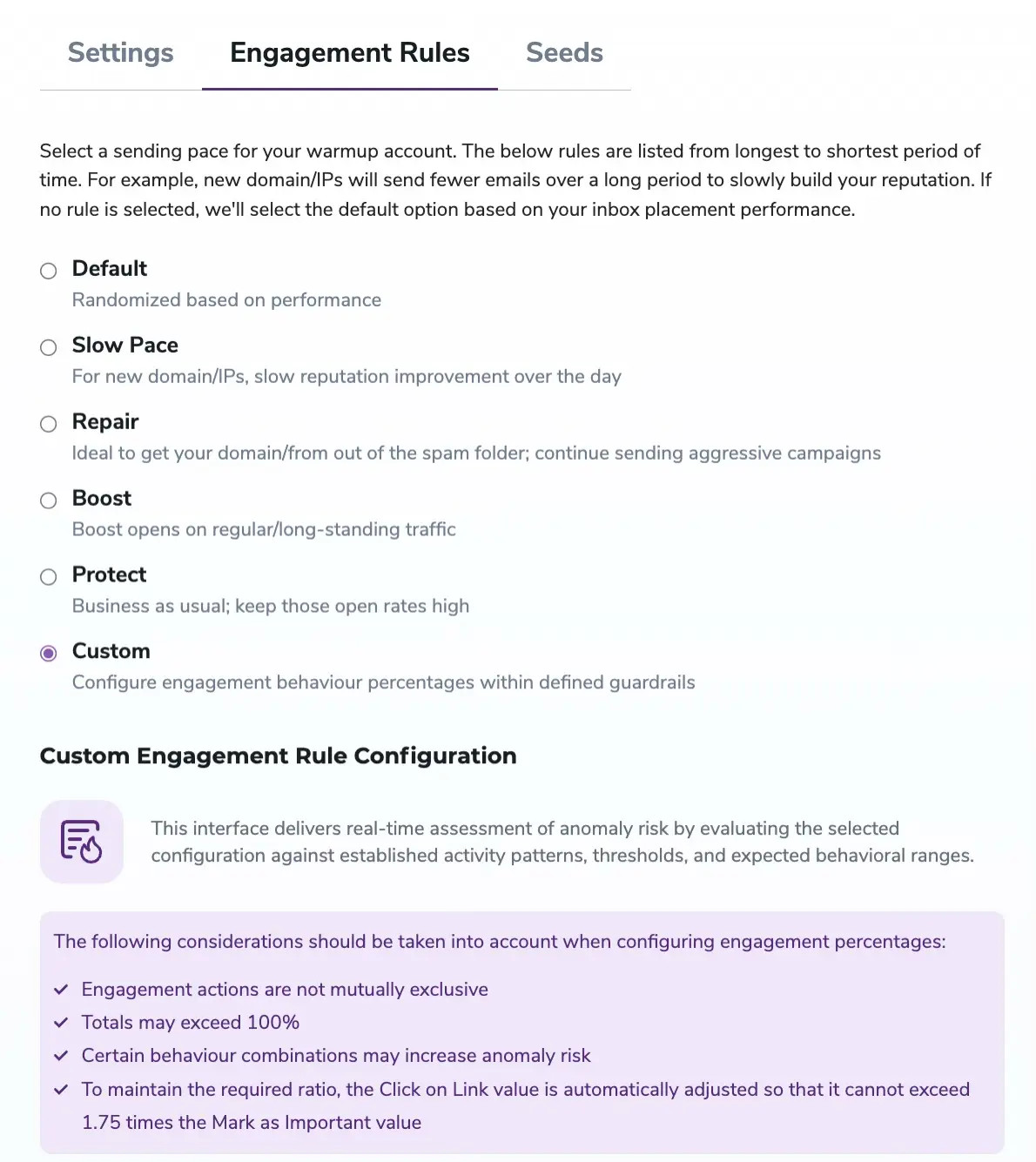
Use the sliders or input fields to set your desired values for Reply, Mark as Important, and Click on Link.
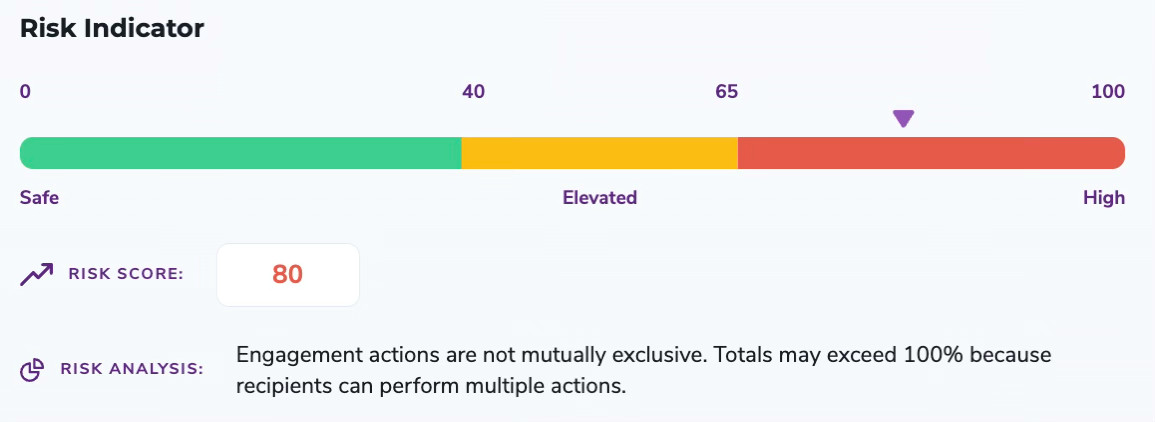
As you adjust the sliders, the Risk Indicator at the bottom of the panel updates in real time, showing you how your configuration scores against established engagement patterns (see Understanding the Risk Indicator below).
If your Click on Link value exceeds 1.75× your Mark as Important value, the system will automatically reduce Click on Link to stay within the permitted ratio.
Click Save Changes to apply your rules. The new percentages will take effect on the next warmup cycle.
Review your Risk Score before saving. A High score (66–100) indicates a configuration that may appear anomalous to inbox providers and could negatively affect deliverability.
Once saved, your configuration is locked for 7 days. This prevents rapid changes that could send inconsistent signals to inbox providers.
During the 7-day cooldown, your existing rules remain active and visible in the Engagement Rules panel. The interface displays the date on which changes will next be permitted. Other Warmup settings (such as daily volume) are unaffected by the cooldown.
The CERC configuration panel includes a real-time Risk Indicator that evaluates your settings against established activity patterns, expected behavioural ranges, and known anomaly thresholds. It gives you immediate feedback on how natural — or unnatural — your configuration looks to inbox providers before you commit to saving it.

Inbox providers use engagement signals — replies, importance flags, and link clicks — to assess whether your emails are wanted. CERC lets you shape those signals deliberately rather than relying on defaults. This helps you:
Inbox providers become suspicious of engagement patterns that are too uniform or too extreme. The recommended ranges — Reply 10–30%, Mark as Important 20–40%, Click on Link 10–20% — reflect natural human behaviour. Staying within these ranges and keeping your Risk Score in the Safe zone is the most reliable approach, especially during active warmup.
Avoid configurations that look unnatural in combination:
Use the Risk Indicator as your guide: if adjusting one value causes the score to jump, consider whether the combination reflects realistic email behaviour for your campaign type.
Yes — positively, when configured thoughtfully. CERC simulates the engagement patterns that inbox providers associate with legitimate, wanted email. Realistic percentages aligned with your campaign type help establish a sender reputation that reflects your actual outreach, making it more likely your live campaigns reach the inbox rather than spam.
No. The three engagement actions are independent and not mutually exclusive — a single warmup email can be replied to, marked as important, and have its link clicked. Totals can and often will exceed 100%. Each percentage is applied separately to your daily email pool.
Yes. Click on Link cannot exceed 1.75× your Mark as Important value. If you set a Click on Link percentage that violates this ratio, the system will automatically reduce it to stay within the limit. This constraint exists because disproportionately high click-to-important ratios are a known anomaly signal. There are no other hard constraints between fields beyond the slider ranges shown in the Overview table.
No. Changes are limited to once every 7 days to maintain consistency. Plan your configuration carefully before saving, as you will not be able to revise it until the cooldown period expires.
The Risk Indicator will flag your configuration with an Elevated or High score before you save. For certain combinations that exceed hard system limits, the change may be blocked or automatically adjusted. Always review your Risk Score before clicking Save Changes.
No. CERC is configured at the individual sending account level. Each account maintains its own independent engagement rules, so you can tailor configurations to match the specific campaigns running from each one.
No. CERC is available to accounts with more than 1,000 seeds. Seeds are the real inboxes in the ZeroBounce network that interact with your warmup emails — a larger seed pool is required to distribute custom engagement percentages reliably. To check your current seed count or discuss upgrading, contact the ZeroBounce team.
