
Docs
Docs
Seed Allocation gives you direct control over how your warmup seeds are distributed across email providers such as Gmail, Yahoo, Outlook, and others.
This allows you to better mirror your real sending behaviour. If most of your campaigns go to Gmail, for example, you can allocate more seeds there. If your audience is spread across multiple providers, you can distribute seeds accordingly.
By aligning your seed distribution with your actual sending environment, warmup activity becomes more realistic and more meaningful, producing stronger and more relevant engagement signals.
To support this flexibility, the platform calculates safe allocation ranges automatically. These safeguards are not designed to restrict you, but to protect the health of the warmup ecosystem by preventing unnatural provider distributions.
Seed allocation is configured at the team level, meaning the settings apply to all warmup accounts within your team.
This opens the Seed Allocation configuration panel.
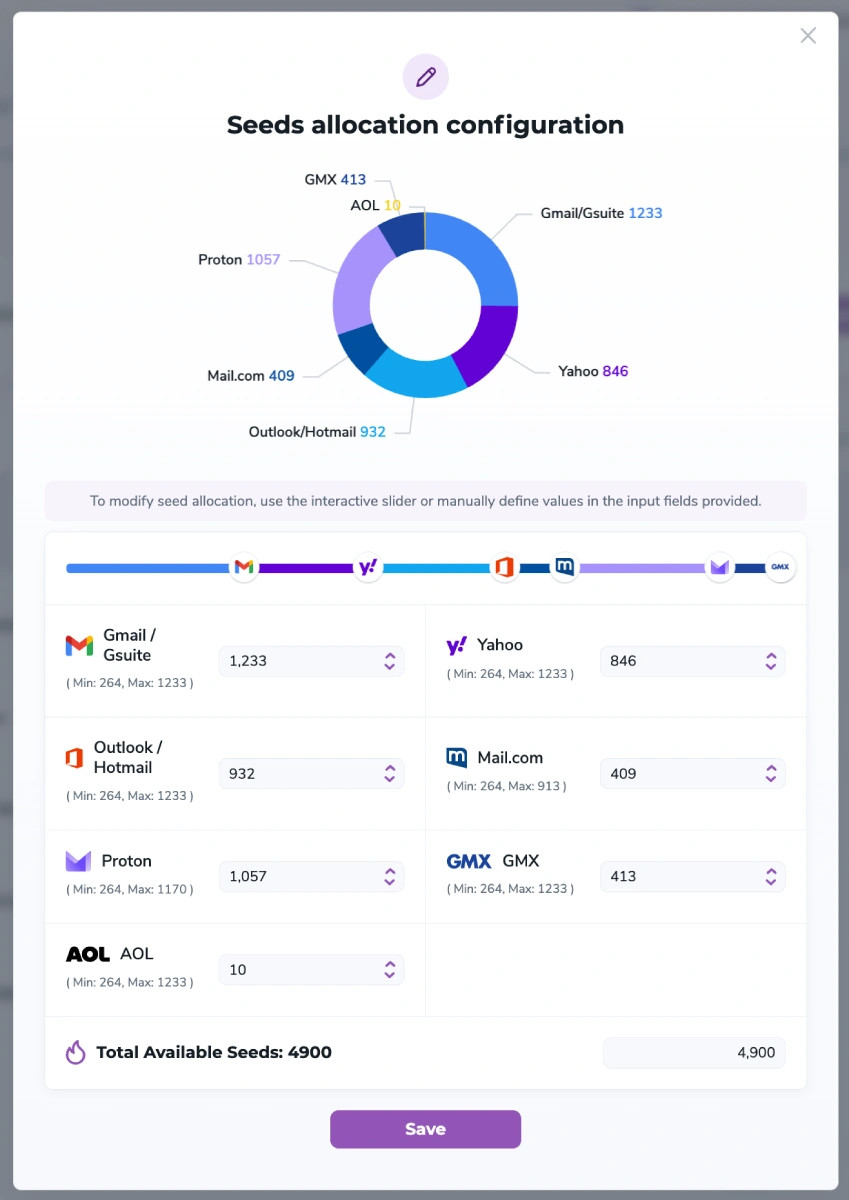
Within the Seed Allocation configuration panel you will see a breakdown of the available providers as well as your current allocation.
For each provider you can see:
Use the slider or numeric input to adjust the number of seeds assigned to each provider.
These ranges are automatically calculated by the platform based on ecosystem capacity and safety thresholds.
Your total allocation must always equal the number of seeds included in your subscription.
For example: If your subscription includes 10,000 seeds, the combined allocation across all providers must equal 10,000.
The Save button will only activate once:
Click Save to apply your new configuration.
Once saved, the platform will automatically rebalance your seed pool based on your chosen provider distribution.
This process happens safely in the background without interrupting your warmup environment.
To maintain stable warmup behaviour, seed allocation can only be updated once every 7 days.
Frequent changes to seed distribution can create unnatural engagement patterns, which may reduce the effectiveness of warmup activity.
If you attempt to update your allocation before the cooldown expires, you will see a message such as:
"You recently changed your seed allocation. You can update it again in X days."
You can still view your allocation, but changes cannot be saved until the cooldown period ends.

When this happens:
If needed, you can resend those campaigns to the newly allocated seeds to continue tracking their activity.
To maintain realistic engagement patterns, the platform calculates safe ranges for each provider. These safeguards help ensure your warmup activity continues to produce reliable signals.
No. Seed allocation is configured at the team level and applies to all warmup accounts in your team.
Yes. You can always view your allocation settings, but changes cannot be saved until the cooldown expires.
