DKIM Generator for Email Security
Create your unique DKIM record using our DKIM generator. Quickly add a unique signature to your email DNS records to enhance your email security and bolster your domain protection efforts.
What is a DKIM record?
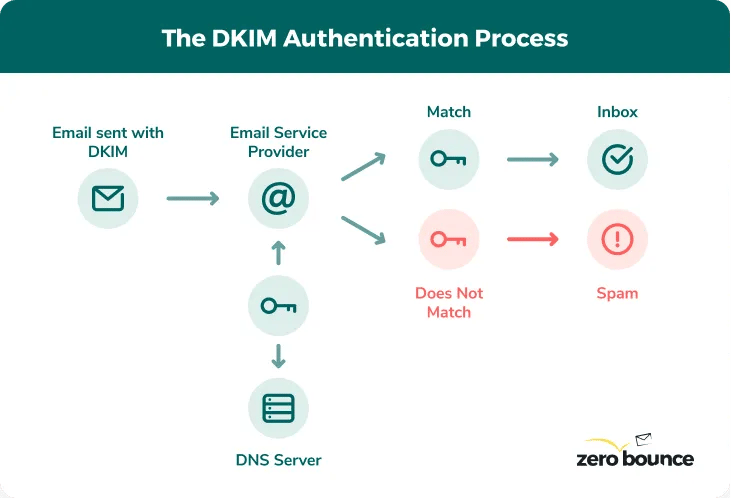
A DKIM record is an email authenticationⓘ and security measure allowing users to add a unique identifier to their outbound emails. Email servers check the DKIM record for the signature and issue a pass or fail for the DKIM check based on the results.
Authorized senders with the DKIM record can send emails using your domain. Meanwhile, DKIM offers domain protection by stopping unauthorized senders who lack the DKIM record necessary to bypass your email security.
You can create a DKIM record easily by taking advantage of a free DKIM generator like the one provided above.
DKIM records and SPF – Which should you use?
Companies should use DKIM records and SPF (Sender Policy Framework). Both email security measures provide different avenues for email authenticationⓘ.
SPF is a list of authorized IP addresses. Email services cross-reference the sender's IP address with those listed in your SPF record. If there is a match, the check passes.
Instead of referencing a list, DKIM adds the security signature to the sender's email. The email service checks for the key before issuing a pass or fail.
If the ISP finds the DKIM signature, the check will pass and the message can reach the inbox. It can also allow valid addresses to send mail even if the SPF check fails for some reason.
Your email domain will be more secure using both record types.

Protect your company emails with DKIM
DKIM records and DMARC for email authentication
A DKIM record is an email authenticationⓘ tactic that encrypts messages with a unique signature. These records offer domain protection and prevent spoofers from sending emails using your domain name.
DMARC (Domain-based Message Authentication, Reporting and Conformance) is a security record that allows you to dictate what happens when a sender fails the DKIM check. This gives you greater flexibility when reviewing suspicious user messages that try to spoof your domain.
Packaging DKIM and SPF records with an established DMARC policy can enhance your email security.

Using the free DKIM generator
Setting up your DKIM record is a simple process you can complete in seconds. If you need a hand, follow these instructions as you navigate the tool.
First, enter the email domain name you wish to protect. You will need to use the DKIM generator for every domain in use. If you're unsure of this, you can identify it by looking at the correct part of a given email address.
Username@domain_name.top_level_domain
It's important to note that you'll want domain protection even for domains that don't deal with outbound mail. Even though you're not sending emails, spammers tend to target these domains. To prevent bad actors from spoofing those domains, generate DKIM records for better domain protection and email authenticationⓘ.
Next, you will need to enter a DKIM selector.
A DKIM selector is an arbitrary string of characters you provide to help your email server identify the correct private and public DKIM key. This is necessary as it allows the server to distinguish which key to use based on the matching selector.
Whenever you send a message, your selector finds the keys and signs the email message with them. Then, the receiving email server uses the same selector to identify the public and private keys within the message.
If you create multiple DKIM records, use a different selector for each.
Finally, select your key size. This is the level of encryption you wish to use for your DKIM. Larger sizes offer more security, but some domains restrict how many characters you can place in your record file. You must check your domain host's documentation for their supported file sizes.
If you wish to use a larger size, contact your host directly. There are often solutions to help users better protect their emails with more sophisticated encryption.
The DKIM generator automatically creates your public and private keys. You need to add these to your email hosting software. Check your email provider's documentation, as it can vary. If you're still unsure, contact your provider and ask how you can implement your DKIM.
Finally, you'll find your selector and policy records. These will point to the corresponding keys you publish to your email software. You'll need to add these as CNAME records within your DNS settings.

Secure your emails with DKIM now
Next steps after using the free DKIM generator
Congratulations on creating your DKIM record!
We strongly recommend using our additional email authenticationⓘ record generators. DKIM records can work with SPF and DMARC to assist with domain protection and dictate what action an ISP should take if a sender fails your email security checks.
Utilizing our other tools with the DKIM generator provides the most significant email security following best practices. Each generator has a handy how-to guide to help generate your records as simply and conveniently as possible.




 2048-bit RSA key generation