
Written by
20 February, 2025
Email is easy, personal, and fast – all it takes is writing a message and hitting “send.” But not every email gets to where it needs to go. Here, we look at how to deal with a bounced email and the steps you can take to avoid email bounces.
Did you know that use email every day? It's one of the reasons that, for businesses, email is hard to beat. There's also tremendous potential for profit. Email has the , with $36 for every $1 spent, with some industries regularly exceeding $40.
Email has almost limitless possibilities. It helps us establish valuable personal and professional connections. Businesses rely on email for just about anything:
However, there is one prerequisite for any email to work: the message must reach the recipient. Unless it reaches the person on the other end, your email only represents wasted time and expense. Emails bouncing are antithetical to the channel’s purpose.
A bounced email is an email that does not reach its recipient. Typically, you get an automated message informing you that your email did not make it to the intended mailbox.
Think of it like trying to throw a basketball over a wall. If the ball got over, it would be received on the other end, which is your goal. If the wall blocks it, the ball bounces back to you.
When an email bounces, you get an automated message known as a bounce message informing you that your email wasn’t delivered. Each bounce provides a code explaining the reason, which helps senders diagnose the problem. For example:
SMTP Response Code: 550 5.1.1 – The email account you tried to reach does not exist.
A high bounce rate means fewer people see your emails, and worse, it can damage your sender reputation. Over time, this can lead to your IP being blacklisted, making it nearly impossible to reach your audience. Prioritizing a low bounce rate ensures your emails land in inboxes where they belong, driving engagement and results.
, hard and soft bounce rates vary by industry. However, when combined for each industry and averaged across the board, a total bounce rate of roughly 2% is considered average.
Here’s how to calculate your bounce rate:
Bounce Rate (%) = (Number of Bounced Emails ÷ Total Emails Sent) × 100
For example, if you send 1,000 emails and 15 bounce, your bounce rate is:
(15 ÷ 1,000) × 100 = 1.5%.
Staying within these benchmarks protects your sender reputation and ensures higher engagement and better results from your email campaigns.
For some, email bounces are little more than a nuisance. The problem is that getting bounces sends a message to internet service providers (ISPs) that you’re a likely spammer. Why? Because spammers tend to send their messages carelessly, which may result in bounces.
When you get bounces in excess of 2%, ISPs think you're a spammer. This leads to a decrease in your . Sender reputations are used by email service providers (ESPs) as a way to determine who is sending spam and who is legitimate. Just because you aren't a spammer doesn't mean you won't be regarded as such.
Be diligent to avoid sending emails to an address that will bounce. Before you send an email, make sure you have a . Not only do you want to reach the person in question, but anything more than two bounces/100 emails will hurt your sender's reputation. You want your bounces to be as close to zero as possible.
There are so many reasons why your email bounced, and it can sometimes be challenging to determine exactly what happened. Here are some prominent reasons.
Either you or the person you’re trying to reach has made a typo, which means the email address is invalid. For example, when you captured someone’s address, you wrote johhn@company.com instead of john@. Or maybe John himself gave you the wrong email.
Pro Tip: Use real-time email verification tools like when capturing email addresses to catch typos or fake entries before they enter your list. For instance, tools can flag invalid formats like "johhn@company.com" instantly.
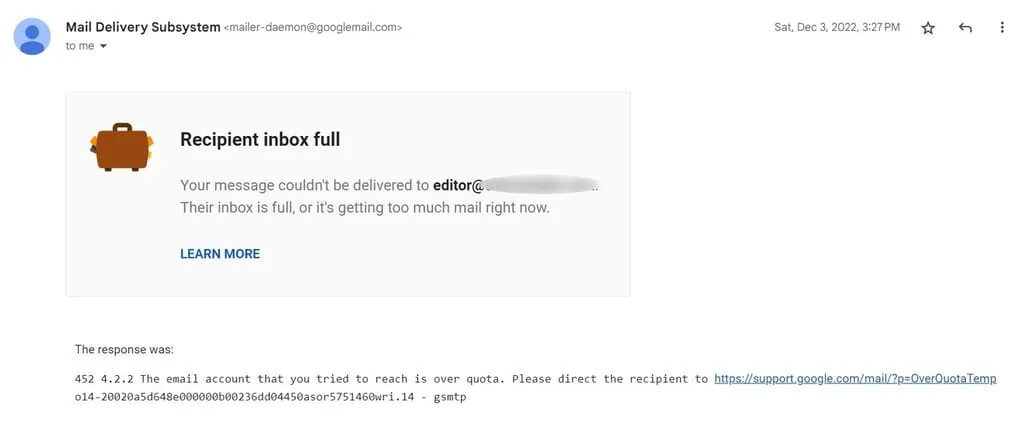
When the message is too large, it could be because you sent a large video file or tons of high-resolution pictures. The email you sent was too big for the inbox provider to accept.
Pro Tip: Compress large files or use links to cloud storage (e.g., Google Drive, Dropbox) instead of attaching bulky files. Keep emails concise with optimized images and file sizes to avoid size limits.
Your emails may bounce if you haven't been following common sense email rules. The ISPs think of you as a spammer because you behave as much as they do. For instance, you may be getting bounces because you don't .
Pro Tip: Improve your sender reputation by maintaining a clean email list, avoiding spammy practices, and authenticating your emails with SPF, DKIM, and DMARC protocols. Regularly monitor your sender score to stay in good standing.
You emailed dave@, but there is no Dave in that domain. That email will definitely bounce unless the administrator has set up their domain as a catch-all. Catch-all domains accept all emails sent to a domain. Even then, having the wrong recipient could lead to a bounce.
Related: .
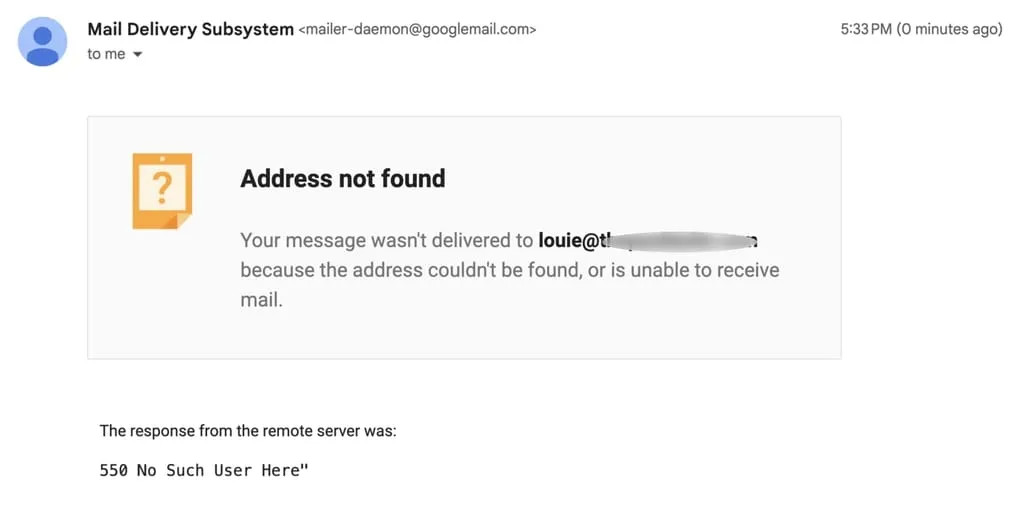
If you send an email to a non-existent recipient, there’s a good likelihood your email will bounce.
Pro Tip: Use an before sending emails to remove invalid addresses from your list. This step ensures you're only sending to active, valid recipients and avoids unnecessary bounces.
Sometimes, you’ll receive a message that your email was blocked, and other times, it will simply bounce. If a recipient blocks you for any reason, there is a good likelihood that you will get a bounce.
Getting a bounce means the email you intended to send did not reach the recipient. You should not consider the message or attachment you emailed to be in any way “delivered” if it bounced.
However, there is a specific type of bounce that isn’t definitive: a soft email bounce.
There are two types of bounces:
How are they different, and what should you be aware of? Let’s find out.
Before addressing any issues that may be causing a higher-than-average email bounce rateⓘ, it’s important to understand what a “bounce” actually is.
When it comes to email marketing, we need to distinguish between .
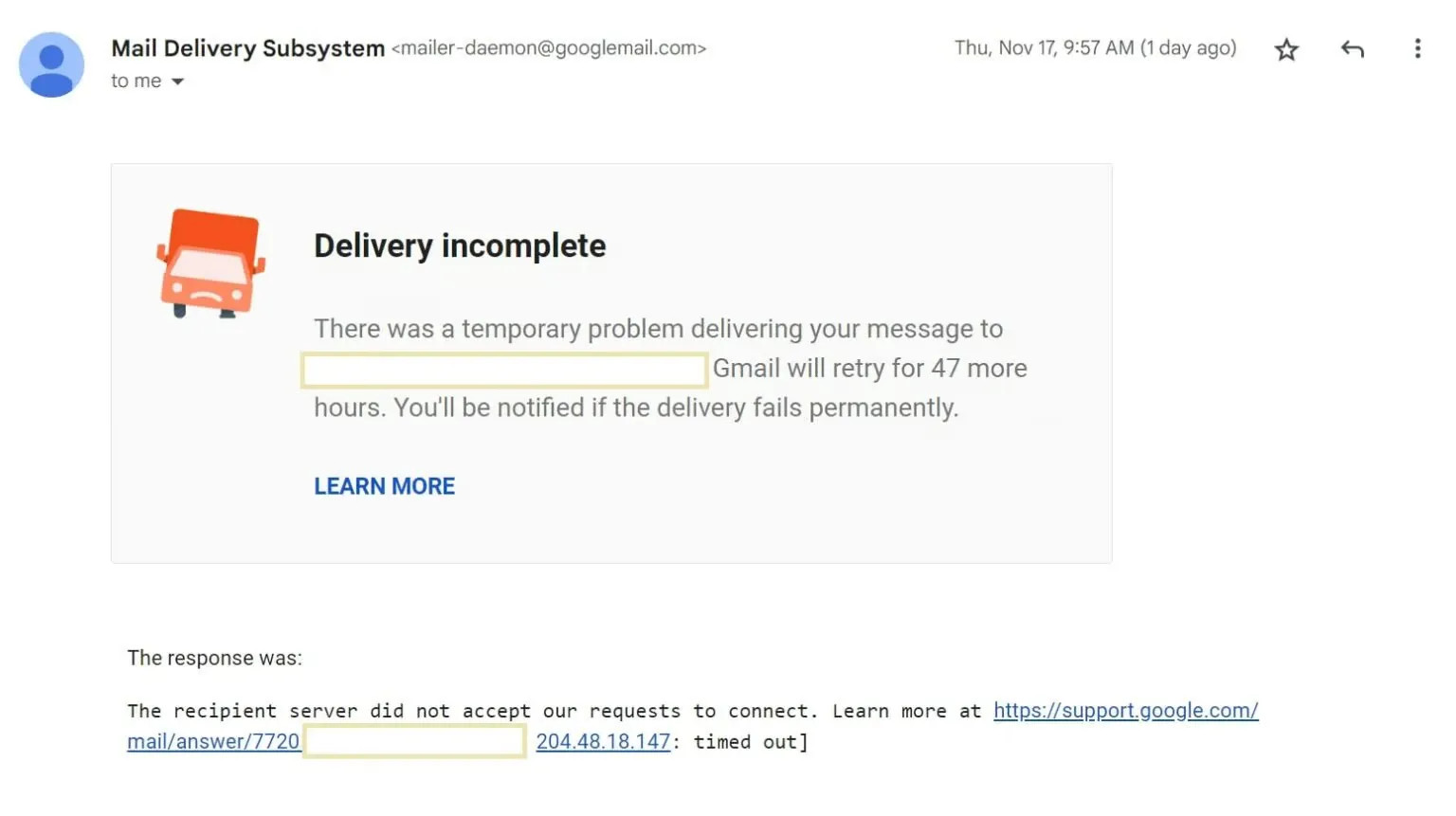
A soft bounceⓘ is a temporary delivery failure. This means that the email has a chance of reaching the recipient in the future. Soft bounces frequently happen when the recipient’s mailbox is full, their server is down, or a spam filter blocks the email.
In the case of soft bounces, your email service provider will continue to attempt delivery. If it doesn’t succeed within 72 hours, your message will not reach that mailbox.
Pro Tip: Immediately remove hard bounceⓘ email addresses from your list to protect your sender reputation. Use email validationⓘ tools regularly to identify and clean outdated or invalid addresses before sending campaigns.
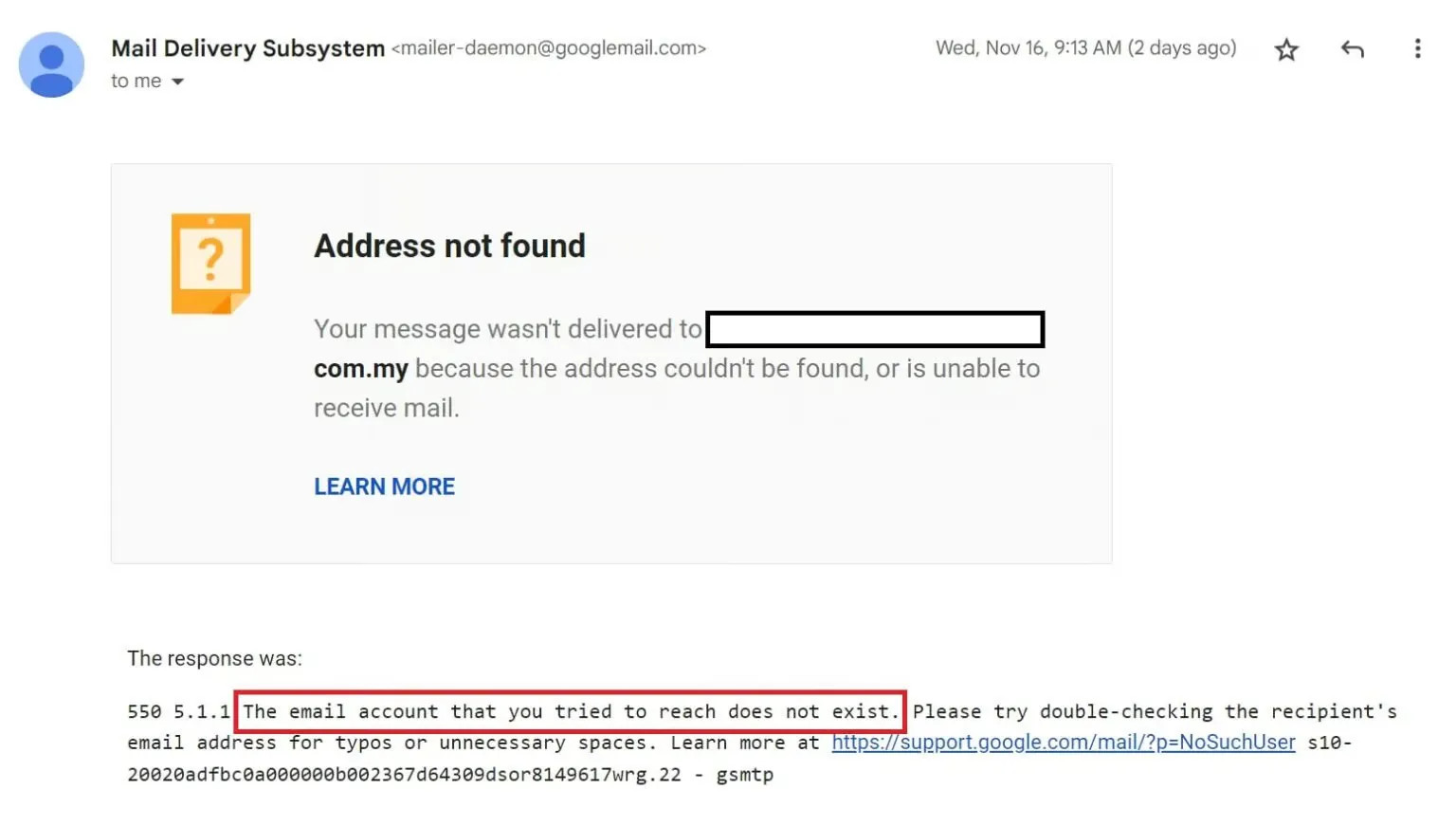
A hard bounceⓘ is a permanent delivery failure, meaning your email will never reach the recipient. There are a few hard-bounce reasons. The email address may be invalid, mistyped, or currently nonexistent.
A hard bounceⓘ indicates you should remove the email address from your contact list and not attempt to send any more emails to it.
Pro Tip: Monitor soft bounces to identify patterns or recurring issues. If the bounce persists after several attempts, temporarily suppress the address and try again later. Keeping your email size small and content optimized can also reduce the chances of a soft bounceⓘ.
Gmail is by far the most popular email service provider. Chances are you have lots of Gmail contacts in your database. And if you’ve noticed an unusually high Gmail bounce rate, you’re not alone.
In an effort to keep security threats down – like phishing and spam– Google began mass-deleting inactive accounts. If you have many dormant subscribers in your list, their emails may be bouncing now due to Google’s initiative.
Related:
Before the Gmail purge, Yahoo was cleaning its own house. In 2019, the tech giant started deactivating and deleting inactive email accounts. This resulted in massive bounce rates for businesses that stored and emailed old contacts.
, who commented that senders shouldn't be holding on to dormant accounts in the first place. Removing them regularly prevents you from getting bounces.
By now, you know bounces hurt your sender reputation and block your future campaigns and newsletters from landing in the inbox. So, how can you prevent email bounces? Here are some important tips for you to prevent email bounces.
Start improving your email list health today with tools. Here's how:
By using ZeroBounce, you’ll proactively prevent bounces, improve your sender reputation, and maintain a healthy list.
Consider making email validation a habit. On average, go bad every year.
Verifying your email list in bulk every quarter will help you avoid bounced emails. But if you want to go a step further, consider real-time email validation. To check emails in real time, to every form where you collect email addresses. If your forms are unprotected, you'll acquire poor-quality data. A real-time email validation API can stop bad contacts from infecting your list.
An email validationⓘ API ensures that every new contact you gather is real and valid.
An email validationⓘ API can stop invalid emails from getting on your list from the beginning.
Not everyone’s email list grows at the same rate. Whatever the purpose of your list, you can make an impact with even a few dozen subscribers.
However, you should routinely check email addresses for freshness. If your email database is growing slowly, to check each contact before adding them to your list.
When starting, you may have come across websites offering to sell you a or tools to "scrape" contact details from various websites. While these methods might seem like an easy way to grow your audience, they come with serious risks. Purchased lists often contain outdated or invalid email addresses, which can lead to high bounce rates and harm your sender reputation. Worse, emailing contacts who never opted in can trigger spam complaints and even get your IP blacklisted.
If you've never cleaned your list or don't have any idea where to start, try a free email list evaluator. You can upload your list, and it will and let you know what is lurking there.
Or maybe you were using a list and stopped emailing those people for a few months. Before you resume sending, get a thorough evaluation of your email list. Otherwise, you may get many bounced emails and jeopardize your future campaigns.
By using these tools strategically, you can prevent bounces, maintain a clean email listⓘ, and protect your sender reputation.
If you’re just starting to learn about bounced emails and how to avoid them, this may have been a lot of information for you. To make things easier, here are the main points to remember:
We hope you found this article useful and informative. To learn more about avoiding bounces, check out .


Zach is the manager and coordinator of (nearly) all things content-related at ZeroBounce. He works closely with all teams, from marketing to design to web development, to quickly deploy written and visual content that communicates how ZeroBounce brings value to your business. Zach has seven years of experience in digital marketing, crafting content for a wide variety of small-to-medium-sized businesses, including healthcare, finance, tech, SaaS, and real estate. When he's not writing, you can find him at the gym, playing or listening to music, or seeking out his next compelling TV show to binge-watch.
Pro Tip: Monitor and resolve spam complaints to minimize the chances of being blocked. Always include an easy opt-out link in your emails to reduce the likelihood of recipients marking your emails as spam.
You can end up on a blacklist simply by emailing what are sometimes called honeypots. They’re email addresses that are designed to lure spammers. Even if you don’t send spam but email one of these honeypots, you could be added to a blacklist which will lead to your emails bouncing.
Pro Tip: Regularly run blacklist checks to ensure your domain and IP address are not flagged. Tools like MXToolbox can help identify if you’re listed, and you can follow their removal processes to restore your sender reputation.
Related:
on February 1, 2024, created new guidelines for mass emailing. DMARC stands for Domain-based Message Authentication, Reporting, and Conformance. If you haven't , you could receive bounces or have your emails end up in the spam folder.
Pro Tip: Set up DMARC, SPF, and DKIM protocols to protect your emails and ensure compliance with major ISPs like Google and Yahoo. These measures validate your identity as a sender and significantly improve deliverability.
A domain name system (DNS) failure can cause an email to bounce. Sometimes, DNS servers go offline, which can be caused by a malfunction at the data center. DNS issues are sometimes only temporary, but they can nonetheless cause a bounced email.
Pro Tip: Monitor your DNS records and set up alerts to detect server outages. Partner with a reliable DNS provider to minimize downtime and reduce the chances of email delivery disruptions.
Many people don't want to give their real contact info. Instead, they use disposable or , sometimes called burner emails.
These emails “self-destruct” after a day or even hours. If you send a message to a disposable email, it will bounce back. It’s one reason why keeping disposable emailsⓘ off of your list makes a lot of sense. If someone doesn’t care enough to give you their real email address, you won’t have meaningful exchanges or do good business.
Pro Tip: Use email verification tools to detect and block disposable or burner emails during sign-ups. This will help maintain a clean, high-quality list and reduce the risk of unnecessary bounces.
Related:
Instead, focus on building your list through an . Subscribers who actively choose to receive your content are far more likely to engage and convert. While it may take longer, creating an opt-in email list ensures you connect with a receptive audience, improving delivery and long-term success. Avoid risky shortcuts and prioritize quality over quantity.
Test our ZeroBounce's free email verifier tool by entering an email below.
or