



















HubSpot only provides a method to verify the email address you use to send marketing emails by way of sending you a verification email. To verify email addresses for your HubSpot CRM contacts, you need to use an email validation integration via an API connection. This service will allow you to export your HubSpot contacts to the email validation tool so that it can validate those email addresses accurately before sending them back to your CRM.
The HubSpot integration is free with a freemium ZeroBounce account, which gives you all integrations, API access, 100 monthly credits, and more. To validate more HubSpot email addresses beyond the monthly 100, you’ll need 1 credit per email address you want to validate.
The ZeroBounce HubSpot integration features bulk email validation, real-time email validation, the ability to schedule validation periodically, Email Scoring, Activity Data, email list sharing, validation reports, and automated import and export of HubSpot email lists.
No subscriptions are ever required to use ZeroBounce. The HubSpot email validation integration is free for all users and comes with 100 credits that replenish each month. For all additional email validations beyond the monthly 100, you’ll need to purchase 1 credit per email address that you wish to validate.
Get 100 free monthly email verifications when you sign up with a business/premium domain.

Integration
Zapier
Workato
Integrate the ZeroBounce email validationⓘ API into your HubSpot CRM workflows to validate your contacts’ email addresses. The HubSpot integration allows you to clean your email lists and automatically stop fake signups from spoiling your database.
All you need is an active HubSpot account and a free ZeroBounce account to get started.
Haven’t tried ZeroBounce? Create a free account today and get instant access to the HubSpot integration, along with 100 credits every month to validate your emails.
Create your free account. No subscription required.

The ZeroBounce HubSpot integration allows you to validate emails in your HubSpot CRM.
The email validator performs syntax, DNS record, spam trap, disposable domain checks, and more on each of your HubSpot emails. Then, it adds a new validation status value to each contact listing so that you know which of your leads are real and which have fake or expired email addresses.
After syncing your chosen HubSpot account with a free ZeroBounce account, we automatically import all email lists found in your CRM. Easily manage all of your HubSpot email lists directly from your ZeroBounce dashboard.
After you complete your email list cleaningⓘ in HubSpot, we automatically export the validation results to your HubSpot account so that you can check the validation status and manage each of your contacts appropriately.
The HubSpot email validationⓘ integration also features real-time validationⓘ checks with Contact Monitoring.
Just swipe the Contact Monitoring toggle on an email list (or all of them) to automatically validate any new email address that’s added to your CRM. Real-time validationⓘ stops fake data from entering your database and keeps your email bounce rates low.
Clean HubSpot email lists periodically with the integration’s Scheduling feature.
You can schedule email validationⓘ for any of your email lists by setting validation or Scoring to occur once every set period (e.g., 30 days).
Plus, you get access to Email Scoringⓘ, which uses our proprietary technology and AI to better understand how your contacts engage with their inboxes. This allows you to segment for better email campaign results.
ZeroBounce Activity Data tells you the last time that a HubSpot email contact interacted with an email.
When cleaning your HubSpot CRM with the integration, click to add Activity Data to your results and find out if a contact has interacted with an email in the last 30, 60, 90, 180, 365, or 365+ days.
Organize your email validationⓘ results and deliver them to the ideal place in your HubSpot CRM.
The ZeroBounce HubSpot integration includes default value mapping settings but allows you to rename and customize your fields at any time for improved organization.
Official ZeroBounce integrations like HubSpot CRM allow you to share your email lists rapidly between any other connected platforms.
We know that not all of your teams work with the same platforms. With Contact Sharing, you can quickly export a HubSpot list to one of your connected tools.
Know when your credits are used and track email validationⓘ results with the HubSpot integration.
You can view automation history by clicking ‘View Automation History’ from the HubSpot integration dashboard. This will give you a full breakdown of every validation attempt that occurred throughout the integration's life.
Setting up our email validationⓘ integration for HubSpot is simple. Here’s what you’ll need:
Then, it’s just a few easy steps to log in and create the connection:
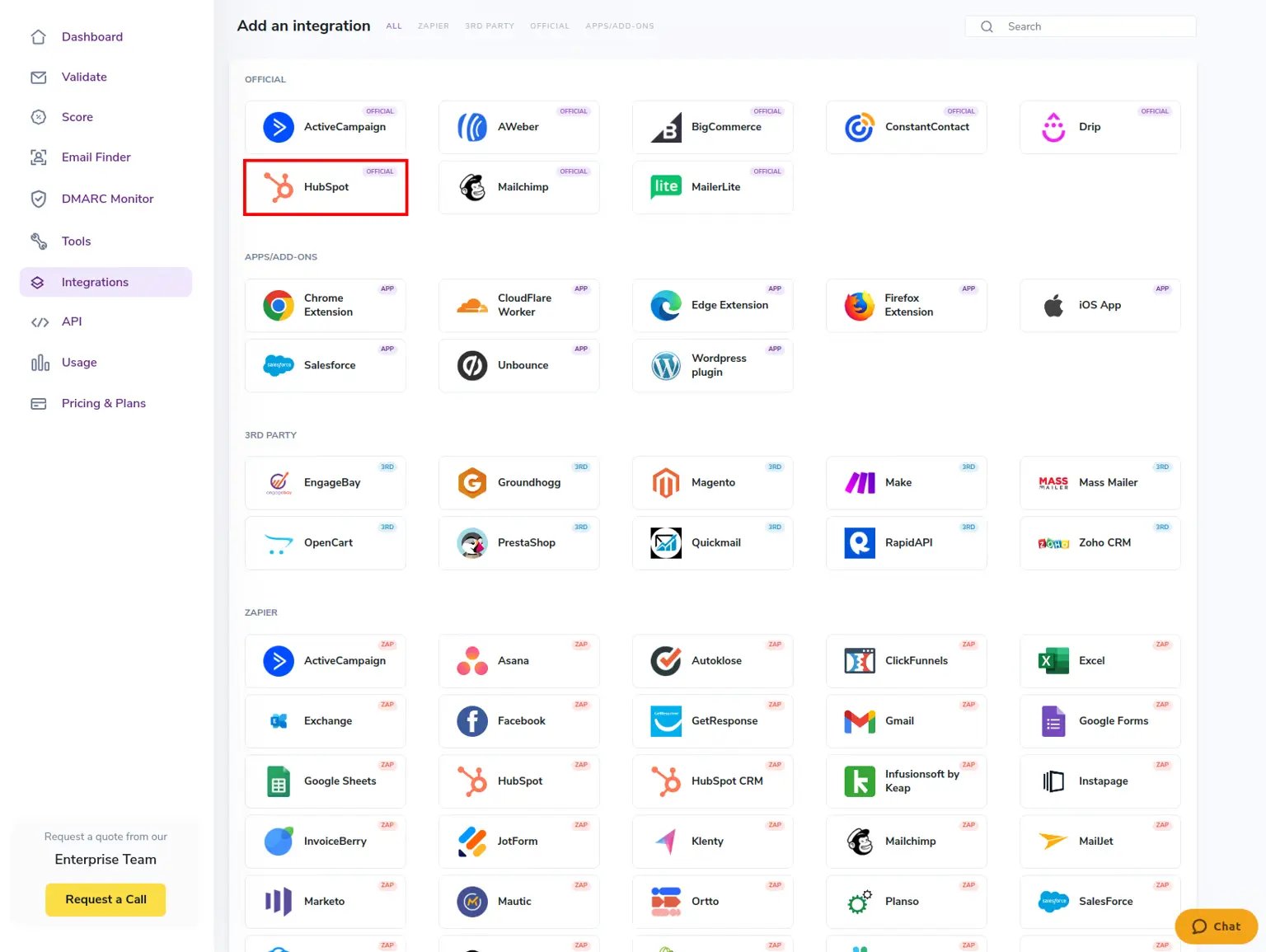
1. Choose HubSpot from ZeroBounce’s list of official integrations.
2. Log in to HubSpot. If you have multiple accounts tied to your HubSpot login, you can choose the correct account at this time.
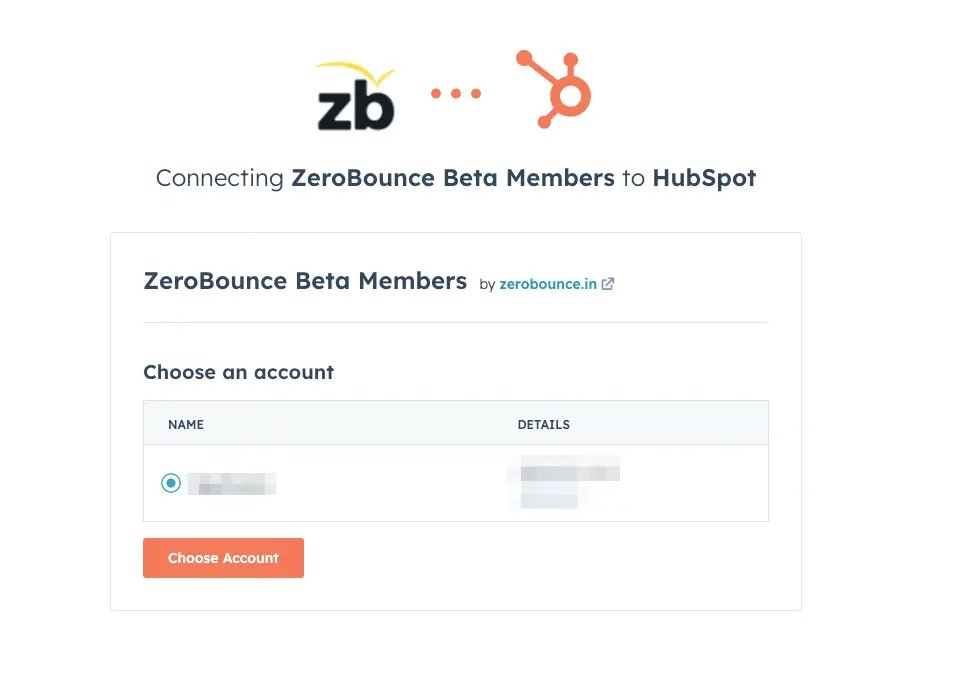
3. Grant access to integrate HubSpot with ZeroBounce.
4. Add the ZeroBounce API script to the embed code HubSpot provides and add it to your web page (the Script is available via the integration and documentation).
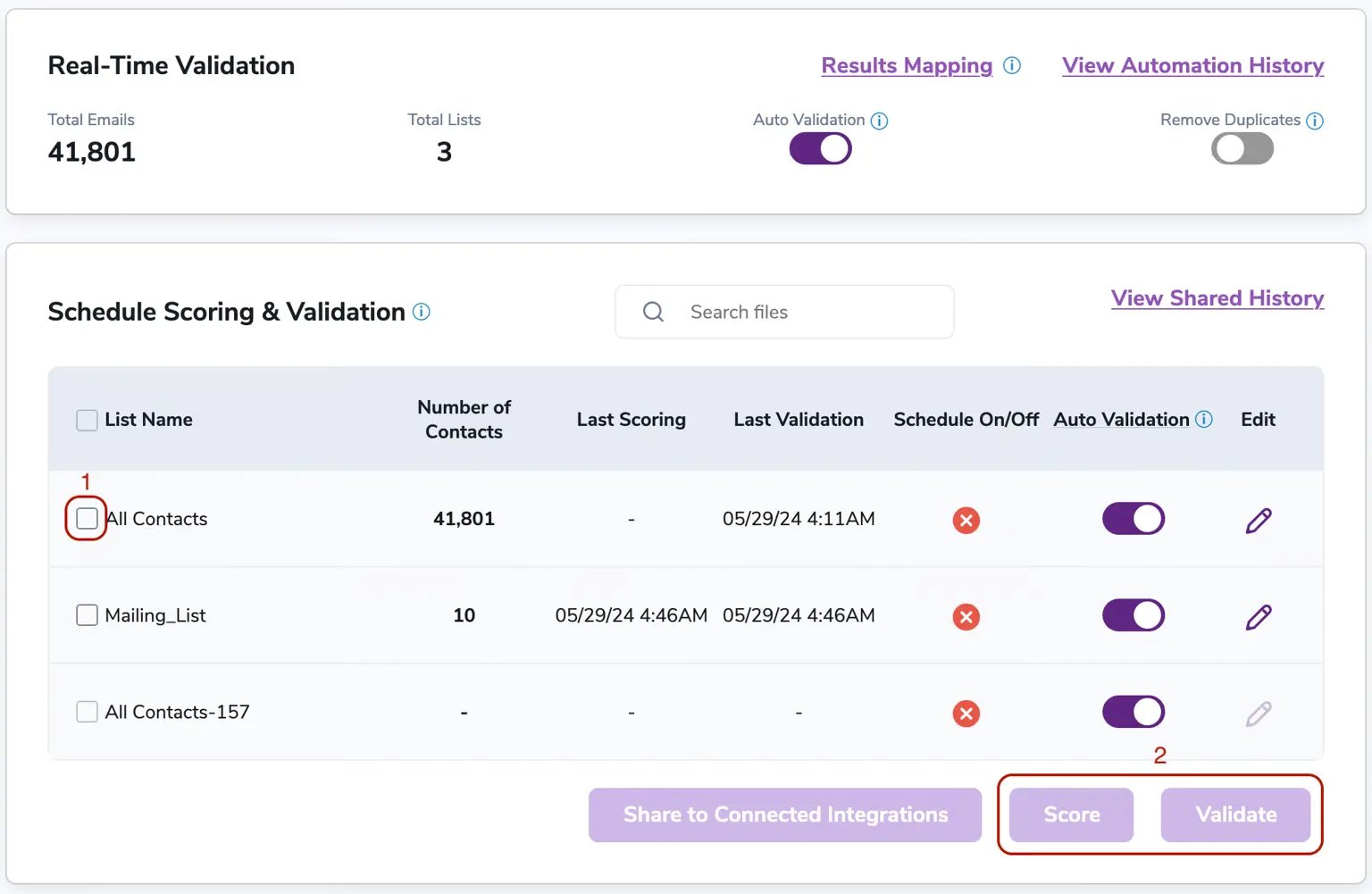
That’s all it takes! Once the connection is made, ZeroBounce automatically pulls your email lists from your HubSpot CRM. You can validate, Score, schedule, and set up Contact Monitoring immediately.
For a more in-depth look at the setup process, check out the HubSpot integration documentation below!
HubSpot documentation Reduce HubSpot email bounce rates
Keep your HubSpot database clean and up-to-date
Stop fake signups and bad data from entering your HubSpot CRM
Improve email deliverability and reach customer inboxes
Enhance your contacts with Scoring and Activity Data for better targeting and segmentation
Don’t wait - clean your HubSpot email lists now at no cost. Create your free ZeroBounce account to gain access to the HubSpot integration and our email validationⓘ API. You’ll also get these monthly benefits:

100 credits for email validation and Email Scoring (credits never expire!)ⓘ

10 Email Finder queries

1 Blacklist Monitor

1 Inbox Placement Test

1 Email Server Test

Real-Time Email Verification API

Access to 60+ integrations

Log in to ZeroBounce and connect your HubSpot account.

Select the email data that you'd like to verify.

Send your clean list back to HubSpot , or download it directly.