




















Integration in Salesforce varies depending on the service you wish to integrate. For the Salesforce ZeroBounce integration, you’ll need to provide your ZeroBounce API key to activate the integration within your Salesforce account.
The Zapier integration requires users to leverage that third-party service to connect their ZeroBounce account to their Salesforce account. Users must maintain a Zapier membership to automate tasks between two applications. This Salesforce integration is a tool officially recognized by Salesforce. Salesforce users can utilize the ZeroBounce API directly within their existing accounts. You no longer need to use the Zapier integration if you prefer to validate your emails now within your Salesforce CRM.
Salesforce integrations allow you to monitor your business activities from one dashboard. This provides a seamless user experience and enables your team to accomplish more tasks and make educated decisions without leaving your preferred platform. It also provides more control over your account security. You can see which team members can utilize various Salesforce features throughout their dashboards. This means less account and credential sharing and less opportunity for user error.
Salesforce is the most popular CRM in the world. There are countless plugins available for users found within the Salesforce AppExchange. These plugins can assist with task management, analytics, sales metrics, email marketing, and more.
A plugin is additional software that users can install into primary software. Brands or third parties often develop plugins to enhance platform functionality without altering the original software. Integration is a code that facilitates communication between two pieces of software. We implement integrations by way of an API (Application Programming Interface). This defines the rules for how one service calls for and receives information from the secondary service. Users are typically responsible for implementing an API integration. In the case of the Salesforce ZeroBounce integration, users retrieve their ZeroBounce API key from their account and provide it to the Salesforce platform. This enables communication between the two services without installing software plugins.
Get 100 free monthly email verifications when you sign up with a business/premium domain.

Integration
Zapier
Workato
Salesforce is the market's most popular enterprise customer relationship manager (CRM) platform. With its expansive sales and task management tools suite, Salesforce helps you find the fastest and safest ways to grow your business.
Now, you can add the ZeroBounce email validation API to your list of must-have Salesforce integrations; find us within the Salesforce App Exchange
But first, check out the new features waiting for you.
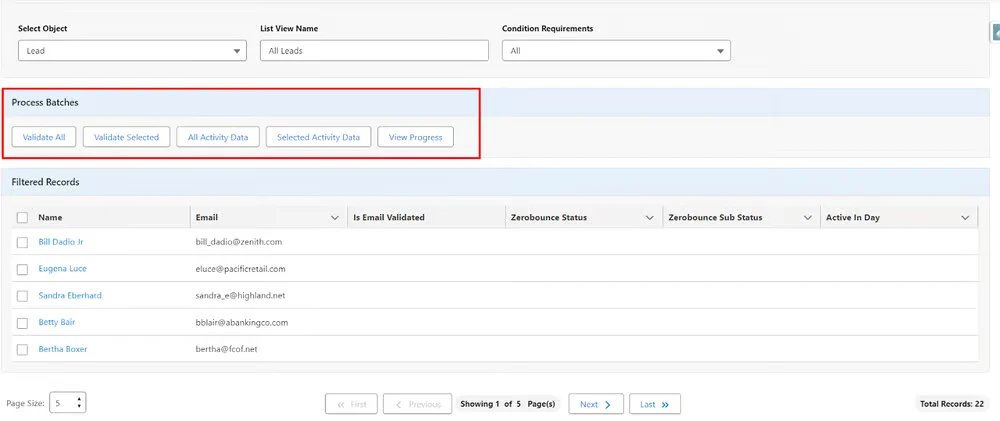
 Effortless installation - No more complex configuration or installation. Easily install the ZeroBounce app via the Salesforce app exchange and start validating emails fast.
Single email validation - Validate any email address in your Salesforce CRM with one click
Batch email validation - Clean emails in bulk by filtering and creating custom lists from your database
Automatic email validation -Automatically validate all new lead/contact emails any time a record is updated by clicking a toggle
Create custom email list segments - Use the easy setup process to create lists for validation using custom logic rapidly
Retrieve Activity Data - Want to know which valid email contacts are most active? Get insights by selecting Activity Data for any validated email address on your list
Scheduled email validation - Schedule email validation or Activity Data for any selected batch. Triggers daily, weekly, monthly, yearly, or at a custom interval.
Credit balance retrieval - Unsure if you have enough credits to verify emails? Stay up-to-date by checking your balance via your Salesforce account.
Install on chosen profiles - Control which team members can use the ZeroBounce app. Install for admins, specific profiles, or all users.
Installing the ZeroBounce Salesforce email verification app is easy.
Head over to the Salesforce App Exchange and click “Get It Now.”
![The ZeroBounce - ,[object Object], app listing on the Salesforce App Exchange with the “Get It Now” button highlighted](/cdn-cgi/image/fit=scale-down,format=auto,quality=85,width=1920,metadata=none/integrations/assets_next/integrations/salesforce-image-2-new.webp)
Select which accounts should have access to the email validationⓘ tool.
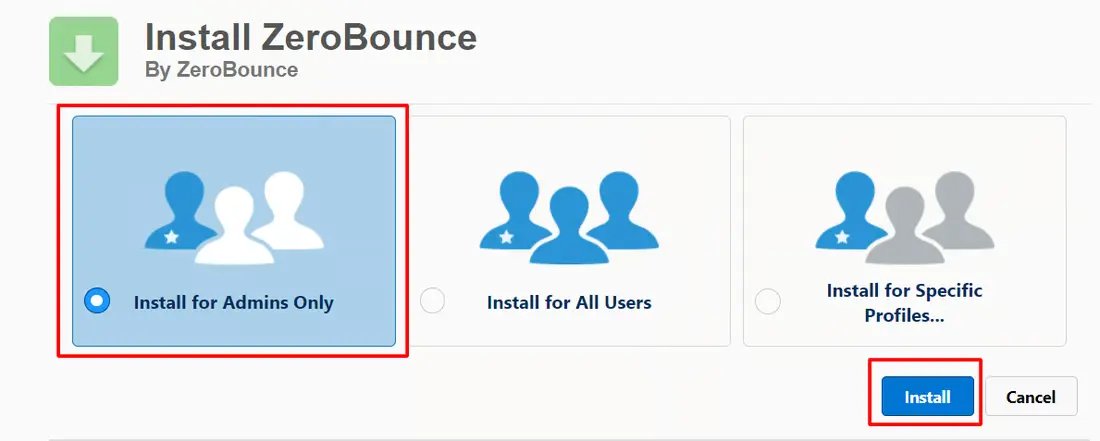
Approve third-party access.
Validate your ZeroBounce API key (you can find this by visiting the API tab from your ZeroBounce dashboard).
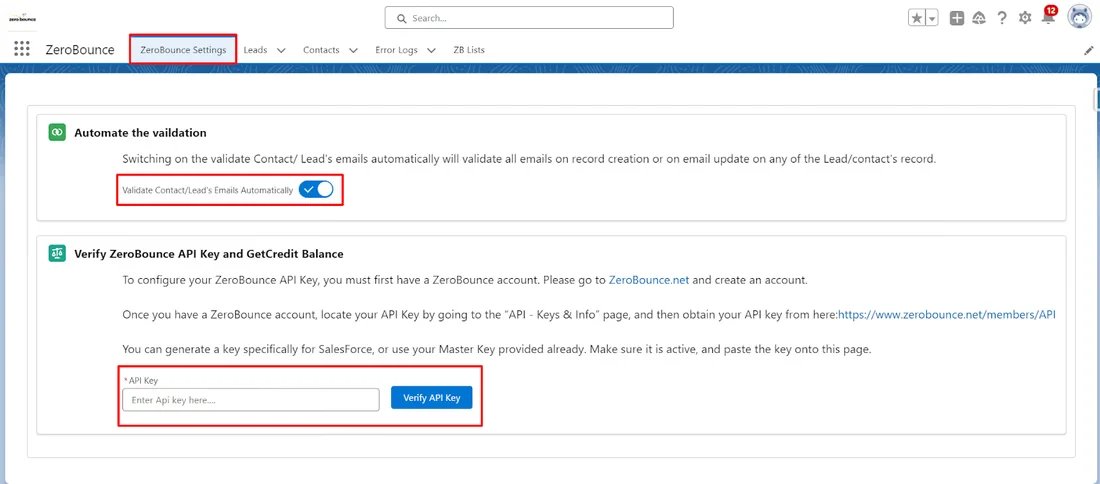
And you’re all set!
For the definitive user guide and more information on how to create lists or scheduled validations, check out the documentation below.
View the User GuideThe ZeroBounce Salesforce email validator API is the most reliable way to stop fake, disposable, abuse, and catch-all emails from harming your email deliverability.
To get started, you’ll need a free ZeroBounce account for your free credits and your API key. All accounts get 100 free email verification credits monthly for testing. Then, you can get more credits as needed to verify your Salesforce contacts.
Get started with the Salesforce integration today to keep your email bounce rate below 2% with 99.6% accuracy!

Log in to ZeroBounce and connect your Salesforce account.

Select the email data that you'd like to verify.

Send your clean list back to Salesforce, or download it directly.