
What Are Spam Traps?
Spam traps don't belong on your email list. Learn what they are and how they affect your deliverability.
Learn moreCatch-all emailsⓘ can belong to real, valuable contacts – or to mailboxes that don’t exist. Learn what a catch-all email means, how these addresses affect your email campaigns, and how to verify catch-all emailsⓘ before you send.

You validated your email list and some addresses came back as Catch-all. Now what?
Catch-all emails can be difficult to handle because a mail server may accept a message without confirming that the individual mailbox actually exists. Automatically removing every catch-all could mean losing legitimate contacts. Sending to unresolved addresses can increase your risk of bounces, which can hurt your sender reputation and email deliverability.
The good news is that a Catch-all result doesn’t always have to leave you guessing. Advanced catch-all validation can resolve many individual addresses as Valid or Invalid. That gives you more information before you decide whether to email them.
A catch-all email, also known as an accept-all email, is an address on a domain configured to accept messages sent to any email address at that domain, even if the individual mailbox doesn’t exist.
For example, imagine a company uses the domain company.com. Its mail server may accept messages sent to both:
With a catch-all configuration, the server may accept both messages instead of immediately rejecting the nonexistent address.
This setup helps companies avoid missing messages, but it also makes email validationⓘ more challenging. Because the mail server may accept both real and nonexistent addresses, simply getting an accepted response from the server doesn’t necessarily tell you whether the individual mailbox exists.
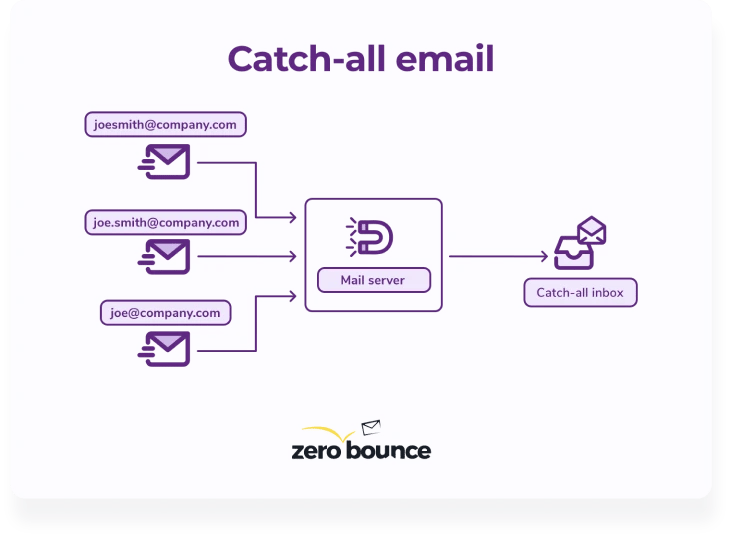
In email verification, a catch-all result means the domain is configured to accept messages without providing enough information to confirm whether the individual mailbox exists.
That distinction matters. A domain can be configured as Catch-all, while individual addresses on that domain may be perfectly valid, invalid, or still impossible to resolve.
Traditional email validationⓘ may identify the catch-all configuration but stop there. That leaves senders like you with a difficult choice: keep an unresolved address and accept the bounce risk, or remove it and potentially lose a legitimate contact.
More advanced catch-all validation can provide greater clarity by evaluating individual addresses and resolving more of them as Valid or Invalid.
Companies may use catch-all configurations to avoid missing important messages when someone sends an email to an incorrect or outdated address.
A catch-all domain may accept a message when:
Instead of immediately rejecting these messages, the mail server can accept them according to the company’s catch-all configuration. This can help businesses preserve customer inquiries, leads, job applications, and other messages that might otherwise be lost.
The same behavior that makes catch-all domains useful for the receiving company creates uncertainty for senders. If the server accepts mail for both existing and nonexistent mailboxes, how do you know whether the individual address on your list is real?
When you validate a typical email address, the receiving mail server can provide information that helps determine whether the individual mailbox can receive email.
A catch-all server behaves differently. It may accept messages sent to any address at the domain, including addresses for mailboxes that don’t exist.
That means server acceptance doesn’t necessarily confirm that the individual mailbox exists.
This uncertainty is what has historically made catch-all emails difficult to verify. Simply identifying the domain as catch-all doesn’t answer the question most senders actually care about: Is this specific email address valid?
A catch-all domain may initially accept an email even when the individual mailbox doesn’t exist. But accepting the message doesn’t always guarantee final delivery.
A catch-all email can bounce when:
That’s one reason catch-all emailsⓘ can be difficult to manage: a server accepting an address doesn’t necessarily mean there’s a valid individual mailbox behind it.
Yes. Advanced catch-all email validation can resolve many individual addresses on catch-all domains as Valid or Invalid.
Some catch-all addresses may still remain unresolved, so no validation method should be treated as a guarantee that every catch-all address will receive a definitive result. But resolving more individual mailboxes gives senders better information than a domain-level catch-all result alone.
Start by validating your email list with a service that can do more than simply identify catch-all domains.
A thorough catch-all validation process should help you:
The more catch-all addresses you can resolve before sending, the less you have to rely on guesswork when deciding which contacts belong on your list.
Verify the address now – free
ZeroBounce takes catch-all validation beyond simply identifying that an email address belongs to a catch-all domain.
Start by running your email list through ZeroBounce email validation. In addition to identifying invalid and risky email addresses, ZeroBounce can validate many catch-all emails and return a more definitive Valid or Invalid result.
ZeroBounce can resolve many catch-all addresses hosted by Microsoft 365, Google Workspace, and major Secure Email Gateway (SEG) platforms during standard validation.
You don’t need a separate catch-all service first. Upload your list or validate an individual email address as usual, and ZeroBounce will attempt to resolve the mailbox as part of the standard validation process.
When an individual address can be resolved, it can receive a Valid or Invalid result rather than remaining Catch-all.
Some catch-all addresses may still remain unresolved after standard validation.
For eligible addresses, Verify+ can take the validation process further to determine whether more of those individual mailboxes are Valid or Invalid.
This additional analysis reduces the number of unresolved addresses and gives you more actionable information about your email list.
Even after additional validation, some individual addresses may still be impossible to resolve confidently.
Those addresses are returned as Catch-all.
A catch-all result doesn’t automatically mean the address is invalid. It means the individual mailbox remains unconfirmed. Treat these addresses with greater caution when deciding whether to email them.
Resolving an individual mailbox doesn’t erase useful information about the domain itself.
ZeroBounce preserves the domain-level Catch-all indicator, so you can see when an address belongs to a catch-all domain even when the individual mailbox receives a Valid or Invalid result.
That gives you both pieces of information: the status of the individual email address and the catch-all configuration of its domain.
ZeroBounce’s catch-all validation methodology has significantly reduced the number of addresses that remain unresolved on some of the world’s most widely used email platforms.
Instead of leaving millions of addresses with an unresolved catch-all result, ZeroBounce can provide more definitive answers about the individual mailboxes behind them.
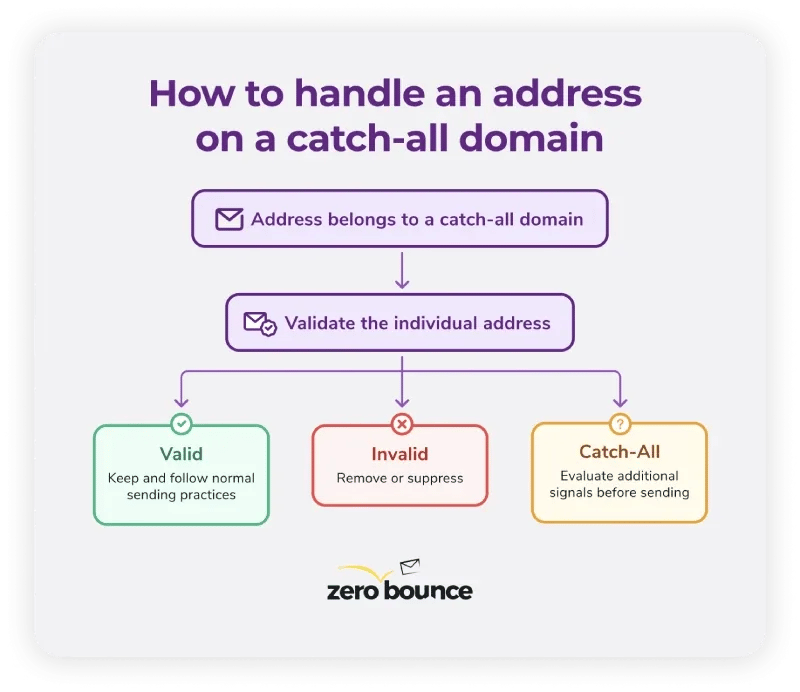
Don’t automatically remove every catch-all email from your list, and don’t automatically send to every one. Start by validating the individual addresses. What you do next depends on the result.
The individual mailbox has been validated as a valid email address. You can treat it according to the same list-management and sending practices you use for your other valid contacts.
Remove or suppress the address from your email list. Continuing to send to invalid addresses can increase your bounce rate and hurt your sender reputation.
The individual mailbox remains unresolved.
That doesn’t mean it’s necessarily invalid or unsafe, but you also shouldn’t assume that it belongs to a valid, active mailbox. Consider the additional risk and use other available information before deciding whether to send.
Catch-all emailsⓘ aren’t inherently harmful to your sender reputation. The risk comes from sending to unresolved addresses without knowing whether the individual mailbox exists.
A catch-all server may accept a message even when the mailbox behind the address doesn’t exist or is inactive. Some messages may later bounce, and repeated sending to poor-quality or unengaged contacts can weaken your email performance.
Validating catch-all addresses first can reduce that uncertainty. Instead of treating every address on a catch-all domain the same way, you can identify more Valid and Invalid contacts and use extra caution for addresses that remain unresolved.
Catch-all addresses can present additional risk in cold email because you may have little or no previous engagement data to help evaluate the contact.
A guessed or sourced address on a catch-all domain may be accepted by the mail server even when that mailbox doesn’t exist. Sending to unresolved addresses without further validation can therefore increase your exposure to bounces and poor engagement.
Before sending cold email to an address on a catch-all domain, validate the individual address whenever possible. If it remains Catch-all, consider the limited information you have about the contact before deciding whether the potential value is worth the risk.
Even after validation and Verify+, some addresses may still return a Catch-all result. Here are a few ways to manage those contacts more carefully.
ZeroBounce Email Scoring can give you another signal when evaluating your contacts.
ZeroBounce assigns email addresses a score from 0 to 10 based on activity data and other signals, with higher scores indicating greater observed email activity.
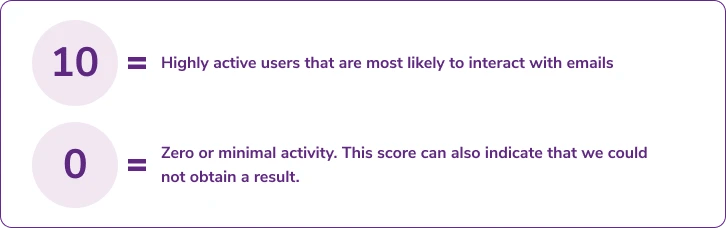
Scoring does not confirm whether a catch-all mailbox is valid, so it shouldn’t replace email validation or Verify+. Instead, use it as an additional data point when deciding how to handle contacts that need further consideration.
A higher score indicates stronger activity signals, while a lower score indicates little or no activity data. Combined with your validation results and your own engagement data, these insights can help you better determine which contacts to keep on your list.
Your own history with a contact can provide information that a validation result alone can’t.
If you decide to email an unresolved catch-all address, monitor your campaign data. Previous engagement, replies, clicks, bounces, and longer-term interaction patterns can help you evaluate whether the contact belongs on your list.
Avoid treating every unresolved catch-all address the same way. A contact with a history of engagement gives you different information than an address you’ve never emailed before.
Email data changes over time. Employees leave companies, mailboxes are abandoned or deleted, and domain configurations change. About a quarter of an email list can decay in a year, according to ZeroBounce’s annual email list decay research.
An address that produced one result months ago may not produce the same result today. Regular email validationⓘ gives you a more current picture of your database before you send.
Use the ZeroBounce Email Validation API wherever you collect email addresses to check new contacts at the point of entry.
Real-time validationⓘ can identify invalid and risky addresses before they enter your database and provide current validation results for addresses on catch-all domains.
Don’t make a blanket decision based solely on the fact that an address belongs to a catch-all domain.
Start by validating the individual address. ZeroBounce can resolve many catch-all emails as Valid or Invalid during standard validation. Verify+ can take eligible unresolved addresses through additional validation.
If an address still returns a Catch-all result, treat it with greater caution. Email Scoringⓘ, your own engagement history, and other information you have about the contact can provide more signals when deciding whether to keep it.
The goal isn’t to eliminate every address associated with a catch-all domain. It’s to replace as much uncertainty as possible with better information before you send.
Validate your email list with ZeroBounce to resolve more catch-all addresses as Valid or Invalid and make better decisions about the contacts that remain.
Get 100 free monthly credits - business or premium domain required

Catch-all, also called accept-all, means a domain is configured to accept emails sent to any address at that domain, even if the individual mailbox doesn’t exist.
This can prevent messages from being immediately rejected when a sender mistypes or incorrectly guesses an email address.
A catch-all email address receives messages sent to addresses on a domain configured to accept mail even when the individual mailbox may not exist. Companies use catch-all configurations to avoid losing messages because of typos, outdated addresses, or incorrectly guessed mailboxes.
For senders, the challenge is determining whether a specific address on that domain belongs to a real mailbox.
A Catch-all result means the domain accepts email in a way that prevents the validator from definitively confirming whether that individual mailbox exists.
It doesn’t necessarily mean the address is valid or invalid. More advanced catch-all validation can resolve many individual addresses as Valid or Invalid, while others may remain Catch-all.
Yes. ZeroBounce can validate many catch-all email addresses and return a Valid or Invalid result during standard
email validationⓘ
, including addresses hosted by Microsoft 365, Google Workspace, and other major email platforms.
Some catch-all addresses may remain unresolved. For eligible addresses, Verify+ can take the validation process further to determine whether more individual mailboxes are Valid or Invalid.
If an address still can’t be resolved, ZeroBounce returns a Catch-all result so you know to treat it with greater caution.
Some
catch-all emailsⓘ
may be safe to send, but you shouldn’t assume that every address on a catch-all domain belongs to a valid mailbox.
Validate these addresses first. If ZeroBounce returns a Valid result, you can treat the address according to your normal practices for valid contacts. If the address remains unresolved as Catch-all, consider the additional risk before sending.
Email Scoringⓘ
and your own engagement data can provide more information to help you decide how to handle the contact.
Not automatically.
Some addresses on catch-all domains belong to legitimate, active mailboxes, so deleting every catch-all could mean losing valuable contacts.
Validate the addresses first. Remove addresses returned as Invalid, treat those returned as Valid according to your normal sending practices, and evaluate addresses that remain Catch-all more cautiously.
They can. A catch-all domain itself doesn’t automatically hurt your deliverability, but unresolved addresses can present additional risk because you don’t know whether the individual mailbox exists.
Sending to nonexistent or inactive addresses can increase bounces and poor engagement, both of which can affect your email performance and sender reputation.
Revalidate your email data regularly and before important campaigns, especially if you haven’t checked your email list recently. Mailboxes and domain configurations can change over time, so an older validation result may no longer reflect the current status of an email address.
The process depends on your email provider, mail server, or domain host. You generally configure catch-all settings through your email or domain administration controls, where you specify how messages sent to nonexistent mailboxes should be handled.
Providers such as Microsoft 365, Google Workspace, cPanel, and domain-hosting platforms have different configuration options and requirements. Consult your provider’s current documentation before enabling a catch-all configuration.
If your goal is to
verify
catch-all addresses rather than create one, use an email validation service that can evaluate individual mailboxes on catch-all domains.