
You can have the most sophisticated email journeys in the world: beautifully designed, perfectly timed, fully automated — and still miss your goals if the data behind them is a mess.
As marketers lean into autonomous marketing, AI agents, and always-on email journeys, data quality has become the biggest predictor of whether those investments pay off. Smarter segmentation starts with better data, it’s the only way effective email automation is possible.
In this post, we’ll break down why email automation fails without clean data, how data issues show up in your day-to-day metrics, and what you can do to fix it — before you scale your next journey.
The hidden contract behind every automation
Every email automation relies on an unwritten contract:
“If this data is true, then send this message, at this time, to this person.”
That’s all automations are: if – then logic built on top of fields, events, and segments. When those underlying inputs are wrong, incomplete, or out of date, your automation does exactly what you designed it to do — for the wrong people, at the wrong time, with the wrong message.
Some examples:
- A welcome series triggered by “Joined list” fires for contacts who subscribed years ago but were just re-imported.
- A post-purchase upsell goes to contacts who never actually completed a purchase because the event didn’t write correctly.
- A re?engagement campaign targets people labeled “inactive” even though they opened and clicked last week (your engagement fields never updated).
From your analytics dashboard, it just looks like low open rates, weak click-throughs, and muted revenue. Underneath it all, what’s really broken is the data powering those decisions.
How bad data breaks your email performance
Here’s how dirty or incomplete data typically shows up in email automation:
1. Email deliverability takes a hit
If you’re sending to invalid, abandoned, or risky email addresses, you’re training mailbox providers to distrust your brand:
- Hard bounces increase because your list includes invalid emails or typos.
- Spam complaints rise when people don’t recognize why they’re on your list.
- Engagement signals (opens, replies, clicks) stay low because much of your list isn’t real or active.
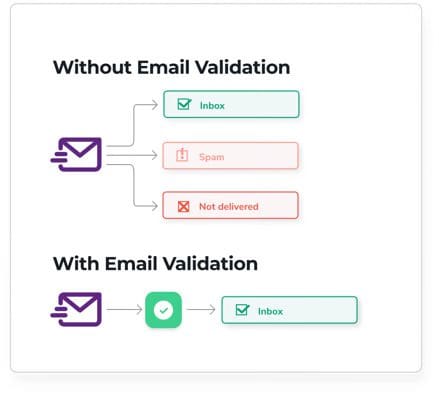
As reputation drops, even your best campaigns sent to even real, engaged subscribers start landing in the promotions tab, or worse, the spam folder. The automation logic isn’t the problem; it’s a matter of list hygiene..
This is where tools like ZeroBounce are critical. Validating emails and removing risky addresses before they ever enter your system is one of the fastest ways to protect your email deliverability and keep your automations performing the way they were designed.
2. Segmentation doesn’t match real behavior
The promise of email automation is “the right message to the right person at the right time.” That promise depends on segmentation that actually reflects who your contacts are and what they do.
When your data is off:
- Contacts are tagged with the wrong lifecycle stage (e.g., “customer” vs. “trial”).
- Interests and preferences are inferred once, then never updated.
- CRM fields stay static while your customers change roles, companies, or needs.
The result is generic messaging disguised as personalization: you’re technically using segments, but they’re built on outdated or incomplete information. Engagement falls, unsubscribes creep up, and it gets harder to prove ROI — even with sophisticated journeys in place.
3. Personalization feels creepy or just plain wrong
Nothing breaks trust faster than an obviously wrong “personalized” message:
- Using the wrong first name or company name because of import errors.
- Recommending products someone already owns.
- Referencing an old location, role, or industry that no longer applies.
This isn’t a copy problem; it’s a data governance problem. Personalization should feel helpful and relevant, not awkward and certainly never inaccurate. Without clean, well-maintained data, every personalized field is a potential risk.
4. Reporting and optimization become guesswork
Finally, dirty data makes it almost impossible to optimize your automations:
- Revenue attribution is off when orders aren’t tied cleanly to contacts or campaigns.
- A/B tests are skewed when segments overlap or contain junk contacts.
- Channel performance is unclear when you can’t trust which contacts did what, and when.
You end up with dashboards that look impressive but don’t drive decisions. Autonomous marketing and Active Intelligence thrive on feedback loops — but they can’t learn from bad inputs.
Why this matters even more with AI and autonomous marketing
AI agents and autonomous marketing systems multiply the impact of your data — for better or worse.
When your data is clean:
- AI can reliably identify patterns in engagement, purchase behavior, and lifecycle stage.
- Recommendation engines can suggest next-best actions that actually make sense.
- Automations can adapt in real time, leading to more relevant customer journeys.
When your data is messy:
- AI confidently optimizes for the wrong goals or audiences.
- Automations reinforce bad segments and outdated assumptions at scale.
- Your team spends more time debugging edge cases than designing new experiences.
In other words, AI doesn’t fix bad data — it exposes it. If you want to get the real benefits of autonomous marketing, you need a data foundation you trust.
Where email automation most often fails without clean data
Across thousands of automations, the same weak spots show up again and again:
- Top-of-funnel acquisition
- Purchased lists, old CSV imports, and poorly gated forms introduce invalid and low?intent contacts.
- No validation step means bad data lands in your ESP and CRM from day one.
- Lifecycle and engagement tracking
- Events don’t fire consistently, or they’re mapped to the wrong fields.
- Key milestones (trial started, demo booked, first purchase, churn risk) are missing or unreliable, so journeys fire at the wrong time.
- Preference and consent management
- Communication preferences live in multiple systems that don’t sync.
- Contacts who opted out through one channel keep getting messages from another.
- Data decay over time
- Role, company, and industry fields never get refreshed.
- Engaged, high-value contacts slowly “disappear” into the wrong segments because their profiles don’t reflect who they are today.
Each of these gaps translates into automation misfires: wrong messages, wrong contacts, wrong timing.
How to fix it: build data quality into your automation strategy
Cleaning your data isn’t a one?time project; it’s an ongoing practice. Here’s how to start tightening the connection between data quality and email automation:
1. Validate at the door
Before a contact ever hits your list:
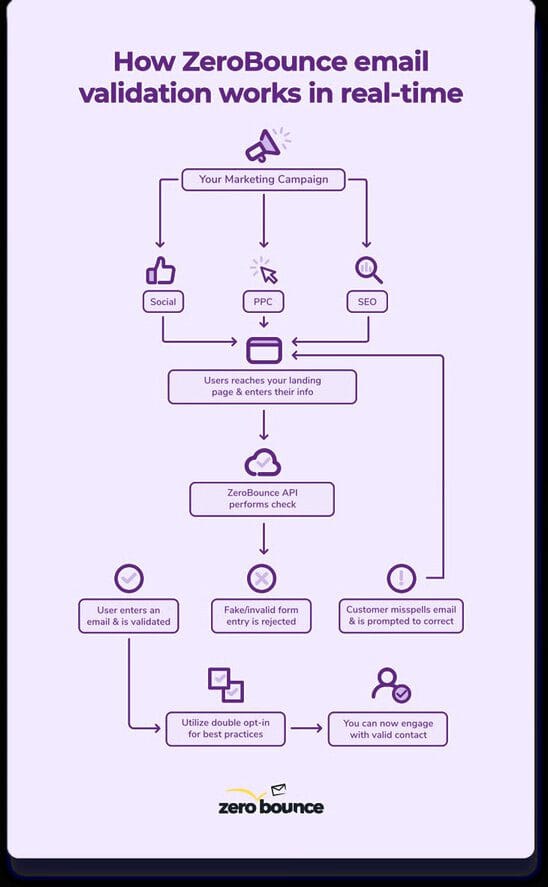
- Use a trusted validation tool (like ZeroBounce) to verify email addresses in real time and in bulk.
- Fix common issues (typos, disposable domains) and remove high?risk contacts.
- Build validation into forms, APIs, and imports so list hygiene is automated, not manual.
This protects your sender reputation and ensures every new automation you build starts with cleaner inputs.
Related: Did you know that ZeroBounce integrates with ActiveCampaign? You can easily verify emails, schedule list cleanings, and score your contacts – try it today.
2. Standardize your fields and events
Map out the minimum data set each key automation needs to run well:
- Lifecycle stage
- Last engagement (open/click)
- Last purchase date and value
- Primary product or interest area
- Consent and communication preferences
Then, work with your team to ensure those fields:
- Exist in one source of truth.
- Are updated by clear, consistent events (not manual edits).
- Are documented, so everyone understands what each field means and how it’s used.
3. Audit your segments and triggers regularly
Set a recurring cadence (monthly, quarterly, etc.) to:
- Review which segments power your most important journeys.
- Spot unexpected contacts in those segments (e.g., internal test emails, very old contacts).
- Tighten filters to match real behavior and business logic, not just historical assumptions.
Think of this as QA for your automations: small fixes in segment logic can unlock big performance gains.
4. Align data quality metrics with campaign KPIs
Treat data quality as part of your performance story, not a technical footnote. Track and review:
- Bounce rate and spam complaints
- Valid vs. invalid emails over time
- Active vs. inactive contacts by segment
- Percentage of contacts with key fields populated
When you connect these metrics to revenue, LTV, and customer experience, it becomes much easier to prioritize cleanup work alongside new campaign launches.
Bringing it all together
Email automation fails without clean data because automation is only as smart as the inputs you give it. If your contact records are inconsistent, your segments are outdated, and your lists are full of invalid or low?quality addresses, even your best?designed journeys will underperform.
The flip side is powerful: when you invest in data quality — validating emails with partners like ZeroBounce, standardizing fields and events, and treating data as a living asset — your automations become:
- More targeted
- More profitable
- More aligned with what your customers actually want
As you explore smarter segmentation and more advanced journeys, start by asking a simple question:
“Do I trust the data this automation is built on?”
If the answer is anything less than a confident yes, that’s the signal to fix your foundation — before you scale your next campaign.
This guest post was written by ActiveCampaign.
Table of Contents
- The hidden contract behind every automation
- How bad data breaks your email performance
- 1. Email deliverability takes a hit
- 2. Segmentation doesn’t match real behavior
- 3. Personalization feels creepy or just plain wrong
- 4. Reporting and optimization become guesswork
- Why this matters even more with AI and autonomous marketing
- Where email automation most often fails without clean data
- How to fix it: build data quality into your automation strategy
- 1. Validate at the door
- 2. Standardize your fields and events
- 3. Audit your segments and triggers regularly
- 4. Align data quality metrics with campaign KPIs
- Bringing it all together

Related Posts
-
 Read Story
Learn how clean email data and accurate call attribution help you reduce wasted spend and invest in the channels that drive revenu...
-
 Read Story
Key takeaways Looking spammy can hurt even legitimate email senders. Small mistakes can raise red flags with both mailbox provider...
-
 Read Story
Want people to read your emails? The rule is simpler than you think: send emails people actually want to receive. It’s been 55 yea...
-
 Read Story
Key takeaways High-income earners are constantly checking their inbox – but getting opened still depends on a subject line that fe...
-
 Read Story
Email marketing is the number one revenue generator, but SMS marketing skips the inbox to send marketing messages directly to cust...
-
 Read Story
Key points: Authenticity stands out in an AI-saturated inbox: As more professionals rely on AI to draft emails, messages are start...